How to Hide Your Followers on Instagram in 4 Steps
Quick answer
Instagram has no setting that hides only your followers list. Make your account private to keep the Followers and Following lists from people you have not approved, or block a specific person so they cannot see your profile at all.
- Business and creator accounts cannot be made private.
- Removing a follower does not notify them.
- Your follower count stays visible even on a private account.
On this page9 sections
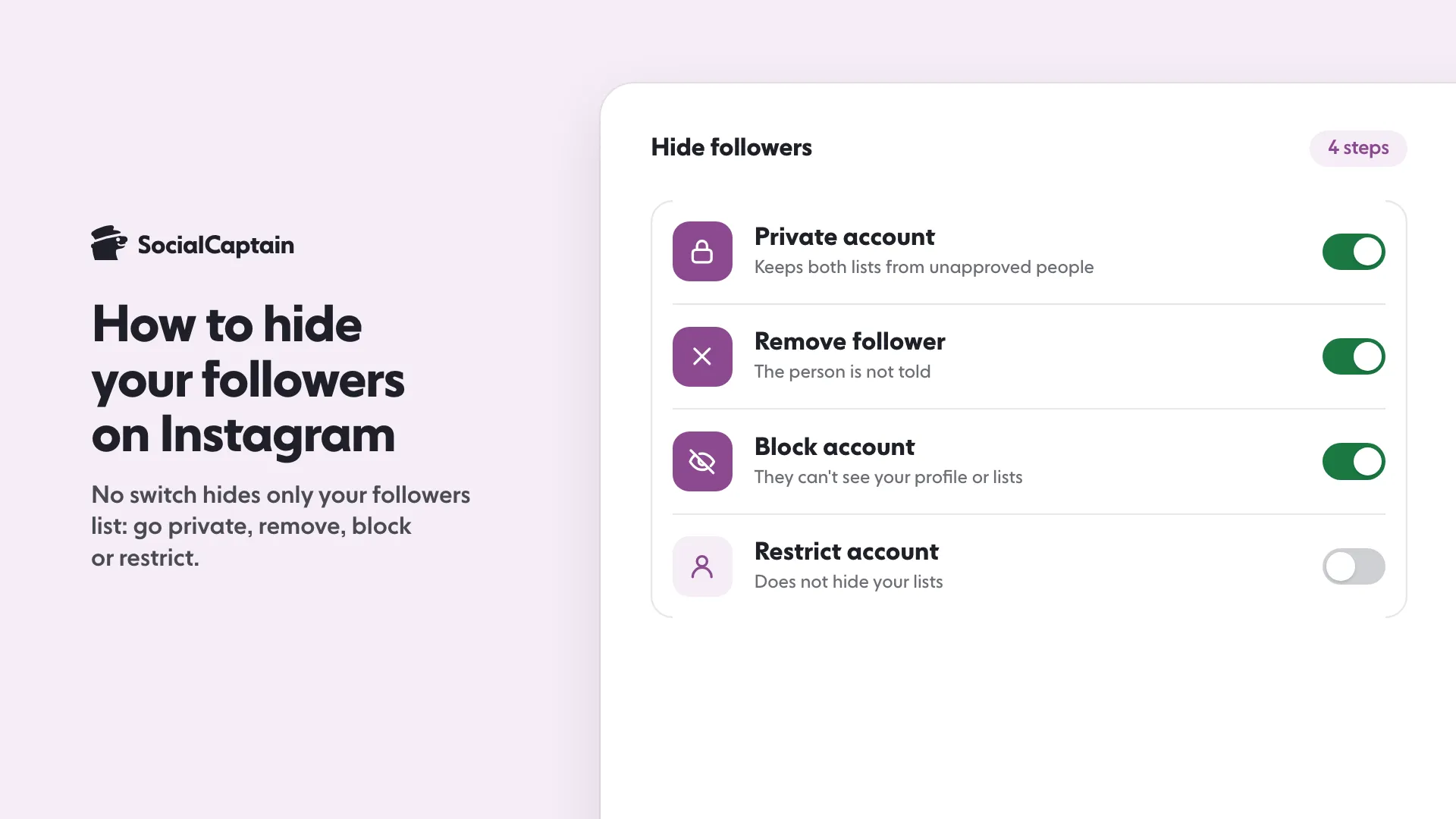
Instagram has no setting that hides only your followers list. The way to do it is to make your account private, which keeps both the Followers and Following lists away from anyone you have not approved. Four steps cover it: switch to a private account, remove the followers you do not want, block anyone who should not see your profile at all, and restrict the people you want to keep at a distance. Below is what each one hides, what it leaves visible and why a business account needs a different plan.
Can you hide your followers list?
Not on its own. Instagram has no toggle for “hide my followers”, and none for “hide who I follow”. Anyone who opens a public profile can tap the follower number and scroll through the names.
What you can do is control who gets to open your profile in the first place. That is the whole trick, and it works through four tools. Each one changes who can see your lists, and none of them changes the numbers at the top of the profile.
Here are the four steps in order, from the broadest to the narrowest:
- Make the account private. Only people you approve can see your posts, Stories and lists.
- Remove a follower. The person leaves your followers list without being told.
- Block an account. The person can no longer see your profile at all.
- Restrict an account. The person stays, but their comments and messages are limited. This one does not hide your lists.
What are the 4 steps, one by one?
Step 1: Make your account private
Open your profile, tap the menu at the top right, find Account privacy and turn on Private account. Confirm when Instagram asks. The wording of the menu shifts a little between app versions, so use the settings search and type “privacy” if you cannot find it.
Your current followers stay. New people have to send a request, and you choose who gets in.
If you switch to private and your existing followers include people you no longer want, step two takes care of them.
Step 2: Remove the followers you do not want
On a private account, open your profile, tap Followers, tap the menu next to the person and choose Remove. On a computer, click Remove next to their name, then confirm.
Instagram’s help centre says the person is not notified that you removed them. They also lose access to your private content. To come back they have to send a new follow request, and you can ignore it.
On a public account, removing someone does little. They can follow you again straight away and still see your profile and lists, which is why removal works best together with step one.
Step 3: Block the account
Blocking is the strongest option. A blocked account cannot see your profile, your posts, your Stories or your lists. It is the right choice when one specific person must not see anything, whether your account is public or private. Instagram’s help centre also lists blocking as the way to stop someone from following you.
You do not need to block everyone you want to hide your lists from. One block per person who should be shut out completely is enough.
Step 4: Restrict the account
Restrict is the soft option. It limits what a person can do to you, such as comments and messages, without telling them. It does not hide your followers list or your Following list. If a person is restricted and also a follower, they can still see both lists. Use it for awkward relationships you want to keep, not for privacy.
How does a private account hide your followers?
A private account works like a gate. Anyone you have approved passes through and sees your posts, Stories, Followers and Following. Everyone else hits the gate.
Here is what that means for the lists:
- Approved followers can still open both lists. Going private does not take anything away from people who already follow you.
- People who are not followers cannot browse the names in your lists.
- You keep full access to everything.
So the order matters. Switch to private first, then clean up the follower list with Remove. Do it the other way round and the people you removed can follow again before you have locked the door.
What does Remove follower do?
It takes one person out of your Followers list and nothing else. It is quiet: no notification goes to the person. It is also reversible, because the person can send a new request if your account is private, or follow you again at once if your account is public.
Remove is a good fit for a clean-up. It is a poor fit for hiding. If your goal is “this person should not see my lists”, the tool is Block, or Remove plus a private account.
How do you hide Following?
The same way as Followers. There is no separate setting for the list of accounts you follow. A private account keeps that list away from people you have not approved.
Two limits are worth knowing before you plan around it:
- You cannot hide a single account inside the Following list. If you do not want an account to appear, the only option is to unfollow it.
- Approved followers can still scroll the list. If one of them should not see it, remove or block them.
What can people still see on a private account?
A private account hides your content and lists, but not your whole profile. Your name, username, profile picture and bio stay visible to people who are not followers, and so do the counts for posts, followers and following. Plan for that: do not put anything in your bio that you would not want a stranger to read.
If you run a creator or business account, one more thing applies. Instagram’s help centre states that a business profile cannot be made private. To use the private setting you would have to switch to a personal account, and you give up the professional tools while you are there, including Insights. If you need analytics, the practical choice is to keep the account public and use Block for the few people who should not see it. Our guide to the 8 differences between a creator and a business account shows what you lose and keep on each type, and Instagram Insights covers the numbers you would be giving up.
Should you hide followers at all?
It depends on what the account is for.
For a personal account, a private profile is a sensible default. You decide who sees your life, and the setting costs nothing.
For a brand, the opposite usually holds. A public follower list is part of how new visitors judge an account: a few thousand real people from the right niche read as a signal that others trust it. Hiding that list removes a reason to follow. If your worry is that competitors can see who follows you, block the one or two accounts involved rather than closing the whole profile.
If your worry is that the list looks thin, hiding it will not fix that. The fix is more followers who actually belong there. How to Get More Instagram Followers: 12 Tactics That Work covers the steady work, and SocialCaptain adds real people from your niche, country, language and interests while you do it, never bots.
Three related questions come up often. If you want a public profile that visitors trust more, How to Get Verified on Instagram: 6 Steps and Requirements covers the badge. If you want to know who left, Who Unfollowed Me on Instagram: 4 Ways to Check shows the methods that work. If you are tempted to clear out a list of accounts that look fake, Instagram Bots: 5 Things They Do and the Risks of Each explains how to spot them first.
FAQ
Can I hide my followers list on Instagram?
Not with a setting of its own. Instagram has no switch that hides only the followers list. The practical route is a private account, which keeps the list away from people you have not approved.
Can I hide who I follow on Instagram?
The same way: make the account private. There is no separate setting for the Following list, and you cannot hide one account inside it. To take an account off the list, unfollow it.
Does removing a follower notify them?
No. Instagram’s help centre says the person is not told that you removed them. On a private account they have to send a new follow request to come back.
Can a business or creator account be private?
No. Instagram’s help centre states that a business profile cannot be switched to private. You would have to change to a personal account first, which means leaving the professional tools behind.
Can I hide my follower count?
Instagram offers no setting for hiding the follower count on your profile. The count stays visible even on a private account.
How do I hide my followers from one person only?
Block that person. A blocked account cannot see your profile, so it cannot see your lists either. Removing them hides your lists only if your account is private.
Sources
- Remove a follower on Instagramhelp.instagram.com
- Make your Instagram account privatehelp.instagram.com
- Controlling Your Visibilityhelp.instagram.com
Related guides
Accounts and verification
How to Get Verified on Instagram: 6 Steps and Requirements
Accounts and verification
Instagram Creator vs Business Account: 8 Differences
Accounts and verification
How to Get Verified on TikTok: Requirements and 6 Steps
Written by Clara Ivens
Instagram growth editor
Clara Ivens covers Instagram growth on the SocialCaptain blog: followers, Reels, hashtags, bios, captions and how reach works. Each guide follows Instagram's own help pages and announcements, and lists its sources at the end.
All articles by Clara Ivens


