How to Get Verified on Instagram: 6 Steps and Requirements
Quick answer
To get verified on Instagram, either subscribe to Meta Verified, which needs a government ID, age 18+ and a profile name matching the ID, or request the free badge if you are a well-known public figure or brand.
- The eligibility rules we found set no follower minimum.
- Meta says Meta Verified review can take up to 3 business days.
- A badge adds trust and impersonation protection; no fixed growth effect is documented.
On this page9 sections
You can get verified on Instagram in two ways: subscribe to Meta Verified, or request the free badge if you are a well-known public figure, creator or brand. Meta Verified needs a government ID, a minimum age of 18, an eligible profile and a profile name that matches the ID. This guide gives the six steps to apply, the requirements, what Meta Verified includes and the common reasons for rejection.
What does Instagram verification mean?
A verified badge tells people that Meta has confirmed the account belongs to the person or brand it claims to be. There are two kinds, and they look the same:
| Meta Verified | Notability badge | |
|---|---|---|
| Cost | Paid subscription | Free |
| Who it is for | Creators and people with an eligible profile | Well-known public figures, celebrities and brands |
| Basis | Government ID check | Notability |
| Extras | Impersonation monitoring and support access | The badge only |
The badge does not mean Instagram recommends the account, and it does not change how the account is ranked in a way Instagram has documented.
What are the requirements?
Meta’s Help Center lists these conditions for Meta Verified for creators:
- You are at least 18, or the age of majority in your country.
- You live in a country where Meta Verified is available.
- You have an eligible profile. Instagram personal profiles and professional creator profiles are eligible. Businesses are directed to Meta Verified for businesses.
- You have a valid government-issued photo ID with your name, photo and date of birth.
- The name on the ID matches your profile name, or the profile name meets Meta Verified naming standards.
- Advanced Protection, Instagram’s extra account-security setting, is on for the profile you verify. You cannot switch it off while you subscribe.
- Your profile meets minimum activity requirements. Meta says these requirements can change, and it does not publish the exact thresholds.
- You follow Instagram’s Terms of Use and Community Guidelines.
Meta may also require a profile picture and name that meet its naming standards. A clear photo of your face is the safe choice.
There is no follower minimum in the eligibility rules we found.
For the free route, Meta looks for accounts that are authentic, unique and in the public interest. Coverage in independent news sources is a typical way to show this, and paid or sponsored coverage does not count.
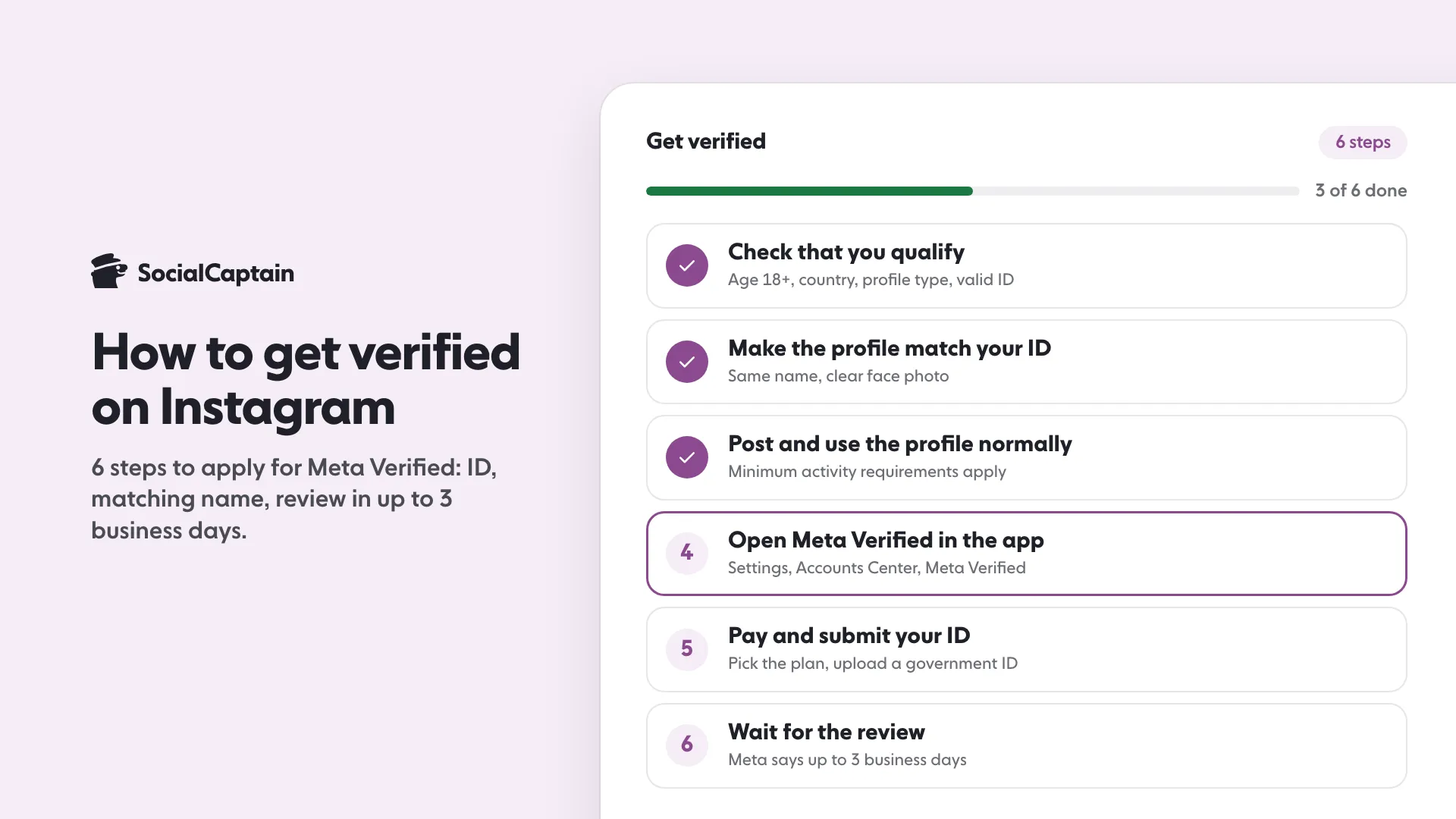
How do you apply in 6 steps?
Step 1: Check that you qualify
Confirm your age, your country, your profile type and that your ID is valid. If you run a business, look for the separate Meta Verified for businesses flow.
Step 2: Make the profile match your ID
Set your profile name to match the name on the ID. Use a clear profile photo of your face. Turn on Advanced Protection. Meta also limits recent changes to details such as the profile name, so do this before you apply.
Step 3: Post and use the profile normally
The profile must meet minimum activity requirements. A profile with no posts is unlikely to qualify. Keep posting on a regular schedule so the account looks active and real.
Step 4: Open Meta Verified in the app
Go to Settings, then Accounts Center, then Meta Verified. The exact menu names can change, so search for “Meta Verified” in Settings if you cannot find it. Choose the profile you want to verify and review the plan.
Step 5: Pay and submit your ID
Pick the plan, set up payment and upload a photo of your government ID when asked.
Step 6: Wait for the review
Meta reviews the request and tells you the result in the app. Meta says the review can take up to 3 business days. Do not change your name or photo while the review runs.
For the free route, open your profile menu, then the Professional dashboard, then Settings, and tap Request verification. The menu names can differ by app version. Submit the information Meta asks for, such as links to independent coverage. Do not send a second request while the first is pending. Meta can take up to 30 days to decide.
What is Meta Verified and what does it include?
Meta Verified is a subscription for creators and individuals. Meta describes the main benefits as:
- A verified badge once your ID is checked.
- Proactive monitoring for accounts that copy your name and photo.
- Access to human support for account problems.
Meta sets the price, and it differs by country and by where you subscribe, so we do not list one here. Check the plan screen in your app.
Two rules to know. First, once you are verified, you may not be able to change your name, birthday or profile photo without going through verification again. Second, Instagram can remove a badge, for example if you try to sell or transfer it.
Why do applications get rejected?
| Reason | How to fix it |
|---|---|
| Name on ID does not match the profile name | Edit the profile name to match the ID, then apply again |
| Photo does not show a face | Use a clear photo of yourself |
| ID is expired, unreadable or not government-issued | Upload a valid ID with a sharp photo |
| Not enough activity | Post and interact for a few weeks, then apply again |
| Profile has broken Instagram rules | Fix the issues and wait for them to clear |
| Wrong profile type | Apply through the business flow if the account is a business |
For the free badge, the most common cause is a lack of independent coverage. A website of your own, a press release you wrote and paid mentions do not prove notability.
Does verification help growth?
A badge adds trust. People see it and are more likely to believe the account is real. It also protects you from impersonation, which matters for creators with a name that others can copy.
We found no independent measurement that shows a fixed increase in followers or reach after verification, and Meta does not publish one. Instagram ranks content by signals such as watch time, likes and sends, as Instagram’s head said in January 2025. A badge does not change those signals.
So treat the badge as a trust tool and grow the audience separately. Start with How to Get More Instagram Followers: 12 Tactics That Work. If you want real people from your niche to find your profile while you prepare for verification, see SocialCaptain’s pricing. Profile type matters for the application, so read Instagram Creator vs Business Account: 8 Differences too.
What should you do if you are rejected?
Read the reason in the app, fix that one point, and apply again. Do not apply many times in a row without changing anything, because the result will be the same. While you wait, keep the profile active, keep your name and photo stable, and collect independent coverage if you are aiming for the free badge.
Also be careful with offers. No one outside Meta can sell you a badge. Messages that promise verification for a fee, or that ask for your password, are scams. Apply only inside the Instagram app, and never share your login or ID with a third party.
FAQ
How do I get verified on Instagram?
There are two routes. Meta Verified is a paid subscription for which you submit a government ID that matches your profile name and photo. A free badge exists for well-known public figures, celebrities and brands that meet Meta’s notability standard.
How many followers do I need to get verified on Instagram?
Meta Verified does not set a follower minimum in the eligibility rules we found. It requires an eligible profile, a government ID, a minimum age of 18 and enough profile activity. The free notability route depends on how well known you are, not on a follower count.
How long does Instagram verification take?
Meta says Meta Verified review can take up to 3 business days. The free notability request can take up to 30 days. Check the status in the app.
Why was my Instagram verification rejected?
Common reasons are a profile name that does not match the ID, a profile photo that does not show your face, an expired ID, missing activity on the profile, or a profile that breaks Instagram’s rules.
Can a business account get the blue check?
Businesses use a separate Meta Verified for businesses process. Creator and personal profiles are eligible for Meta Verified for creators.
Does a blue check help you grow?
It adds trust and impersonation protection, but a badge does not replace content people want to follow. We found no independent data showing a fixed growth effect.
Sources
- Eligibility requirements for Meta Verified creator subscriptionshelp.instagram.com
- ID requirements for Meta Verified creator subscriptionshelp.instagram.com
- Profile name eligibility for Meta Verified creator subscriptionshelp.instagram.com
- About Meta Verified for creatorshelp.instagram.com
Related guides
Accounts and verification
How to Get Verified on TikTok: Requirements and 6 Steps
Accounts and verification
Instagram Creator vs Business Account: 8 Differences
Accounts and verification
How to Remove Followers on Instagram: 3 Ways, Including Bulk
Written by Clara Ivens
Instagram growth editor
Clara Ivens covers Instagram growth on the SocialCaptain blog: followers, Reels, hashtags, bios, captions and how reach works. Each guide follows Instagram's own help pages and announcements, and lists its sources at the end.
All articles by Clara Ivens


