TikTok Business vs Personal Account: 7 Differences
Quick answer
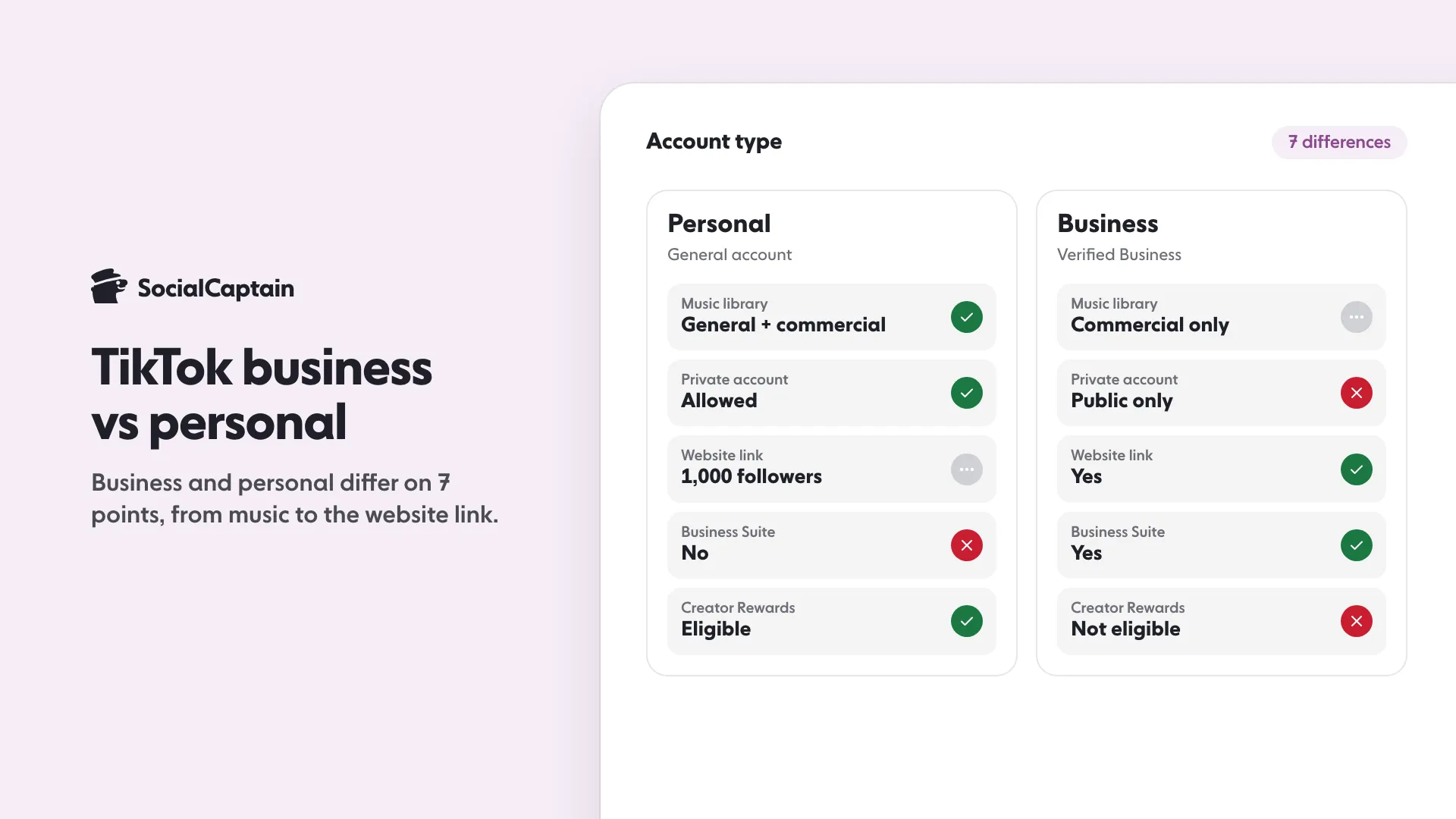
A TikTok business account, called a Verified Business Account, differs from a personal account in 7 ways: music library, monetization, privacy, analytics, website link, public business details and Business Suite. Personal suits most creators; business suits promoting a product.
- Business accounts use the Commercial Music Library only.
- Only personal accounts can join the Creator Rewards Program.
- Switching back loses your business verification, so you would re-apply.
On this page7 sections
A TikTok business account, now called a Verified Business Account, differs from a personal (General) account in 7 ways: the music library, monetization, privacy, analytics, the website link, public business details and the Business Suite. A personal account suits most creators; a business account suits anyone whose main goal is to promote a product or service. You switch in the app under Settings and privacy, then Account, then Business verification. This guide explains each difference and the switching rules, based on TikTok’s Help Center account types page and creator portal, read on 11 November 2026.
What account types does TikTok have?
TikTok’s account types page lists three: a General TikTok Account (also called a Personal Account), a Verified Business Account and an Organization Account. General accounts are the choice for most people, content creators and most public figures. Verified Business Accounts are public profiles for brands and businesses. Organization Accounts let several team members manage one account, are not available everywhere and can only be created from certain business platforms such as the TikTok Shop Seller Center.
TikTok also names a TikTok Account with Advanced Access, which can enter the Business Suite and use conversion anchors without being a Verified Business Account. This guide compares the two types most people choose between.
What are the 7 differences?
| Feature | Personal (General) account | Verified Business Account |
|---|---|---|
| Music | General music library and Commercial Music Library | Commercial Music Library only |
| Monetization | Monetization programs and features, where available | Not in the Creator Rewards Program |
| Privacy | Can be set to private | Public profile |
| Analytics | TikTok Studio Analytics | Analytics in the Business Suite |
| Website link | Needs at least 1,000 followers | Can post a website link |
| Public business details | Not available | Business address, email or phone on the profile |
| Business Suite | Not available | Business Suite with leads manager and Creative Hub |
Music
Personal accounts have access to the general music library and the Commercial Music Library. TikTok says Verified Business Accounts do not have the general library, because those songs are not cleared for commercial use and are restricted to personal entertainment use. They use the Commercial Music Library, a collection of songs and sounds pre-cleared for commercial use.
Monetization
A General account can access TikTok’s monetization programs and features, though some are not available everywhere and some need you to meet criteria. TikTok’s Creator Rewards Program page says only Personal Accounts are eligible and Business Accounts do not qualify. See the TikTok Creator Rewards Program for the rest of its rules and the TikTok money calculator for an estimate.
Privacy
A personal account can be private, so only people you approve can follow you and view your content. Verified Business Accounts are public profiles.
Analytics
Both account types show insights on post, follower and LIVE performance. Personal accounts use analytics in TikTok Studio and Verified Business Accounts use analytics in the Business Suite. For both, you need at least one public post to see analytics. To read the numbers once you have them, see TikTok Analytics: 9 Metrics to Track.
Website link
General accounts with at least 1,000 followers can post a website link on their profile. Verified Business Accounts can post one to promote a website without that follower minimum. Our guide on how to add a link to your TikTok bio covers the steps.
Public business details
Only a Verified Business Account can show a business address, email or phone number on its public profile.
Business Suite
The Business Suite is the central place for a Verified Business Account’s extra features, including its analytics dashboard and leads manager, and it is available in the app or on a web browser. The Creative Hub, which searches trending content and shows content strategy tips, sits inside it.
How do you switch to a business account?
TikTok lets you change a General account to a Verified Business Account, or back, from your settings:
- In the TikTok app, tap Profile at the bottom.
- Tap the Menu button at the top, then Settings and privacy.
- Tap Account.
- Tap Business verification, then follow the steps to switch.
Depending on your location, the process and the business documents required may vary. Once your business is verified you get an in-app notification and a confirmation email, which TikTok says may take up to 5 business days. You can check the status on the Business verification page.
What should you know before switching?
- Do not switch back and forth. TikTok advises against it because your verification is not saved and you must verify again.
- Keep two accounts if you mix personal and promotion. TikTok recommends separate accounts if you want to promote a business and post personal content.
- You may be asked to verify again. If you do not verify when TikTok asks, the account may be converted to a General account and lose Verified Business features.
- The blue check is separate. Business verification is a separate process from receiving a verified badge. See how to get verified on TikTok.
Which account should you choose?
Choose a personal account if you create content, want to be eligible for the Creator Rewards Program, want the full music library or want a private profile. Choose a Verified Business Account if your main goal is to promote a product or service, you need business details on your profile or you want the Business Suite. If you are comparing the same decision on Instagram, read Instagram creator vs business account and the guide to verified accounts on Instagram. Either way, a larger real audience makes the account work harder; see the TikTok followers page for how SocialCaptain matches people to your niche.
FAQ
What is the difference between a TikTok business account and a personal account?
A General (personal) account can use the general music library, can be private and can join monetization programs. A Verified Business Account is public, uses the Commercial Music Library, can add a website link and business details, and gets the Business Suite.
Is a TikTok business account free?
TikTok’s account types page describes no fee for a Verified Business Account. You apply under Business verification and submit business information and documents, and approval may take up to 5 business days.
Can a business account use trending music on TikTok?
Not from the general library. TikTok says Verified Business Accounts do not have access to the general music library because those songs are not cleared for commercial use. They use the Commercial Music Library instead.
Can you switch back from a business account to a personal account?
Yes, from the same settings, but TikTok advises against switching back and forth. Your business verification is not saved, so you would need to verify your business again to regain the features.
Can a business account earn from TikTok’s Creator Rewards Program?
No. TikTok’s Creator Rewards Program page says only Personal Accounts are eligible, and Business Accounts do not qualify.
Can you add a link to your bio with a business account?
Yes. Verified Business Accounts can post a website link on their profile. A personal account needs at least 1,000 followers for the same link.
Sources
- Account types on TikTok | TikTok Help Centertiktok.com
- Adding a website link to your profile | TikTok Help Centersupport.tiktok.com
Related guides
Accounts and verification
How to Get Verified on Instagram: 6 Steps and Requirements
Accounts and verification
How to Get Verified on TikTok: Requirements and 6 Steps
Accounts and verification
Instagram Creator vs Business Account: 8 Differences
Written by Luca Fenwick
TikTok editor
Luca Fenwick covers TikTok on the SocialCaptain blog: followers, views, the For You feed, bios, video formats and the creator programs. Each guide follows TikTok's own help pages and announcements, and lists its sources at the end.
All articles by Luca Fenwick


