What is the best time to post on Instagram?
There is no single best time for every account, and the large studies prove it: five of them found five different peaks, from 5 a.m. to late evening. Four of the five rank Saturday among the weakest days. This planner gives you a starting schedule instead: three posting hours for each day of the week and the five strongest slots overall. It is a rule of thumb for your niche, not data from your account, so test it against your own results and replace it as they come in.
Choose one of 10 niches: fitness, food, travel, fashion, beauty, business, photography, tech, entertainment or general. Then set the time zone where your audience lives, and the hours convert to your own clock. The result updates as soon as you change the niche or the zone, so you can compare two audiences quickly. If your audience is spread across several countries, choose the time zone where most of them are.
What does the starting schedule look like?
Times are in your audience's local time. Here are three examples from the planner.
| Niche | Weekdays | Weekends |
|---|---|---|
| General | 12:00, 18:00, 20:00 | 10:00, 13:00, 19:00 |
| Business | 08:00, 12:00, 17:00 | 10:00, 19:00, 20:00 |
| Fitness | 06:00, 12:00, 18:00 | 08:00, 10:00, 17:00 |
Each day also has a weight. Business, for example, is strongest from Tuesday to Thursday and weakest on Saturday. The top 5 slots list ranks hours and days together, so you know where to start if you can only post a few times a week. Weekends have their own hours, so a Saturday morning slot may differ from a Tuesday lunchtime one. The planner keeps these apart, which is why each day shows three hours of its own.
What do the big studies say about the best time to post on Instagram?
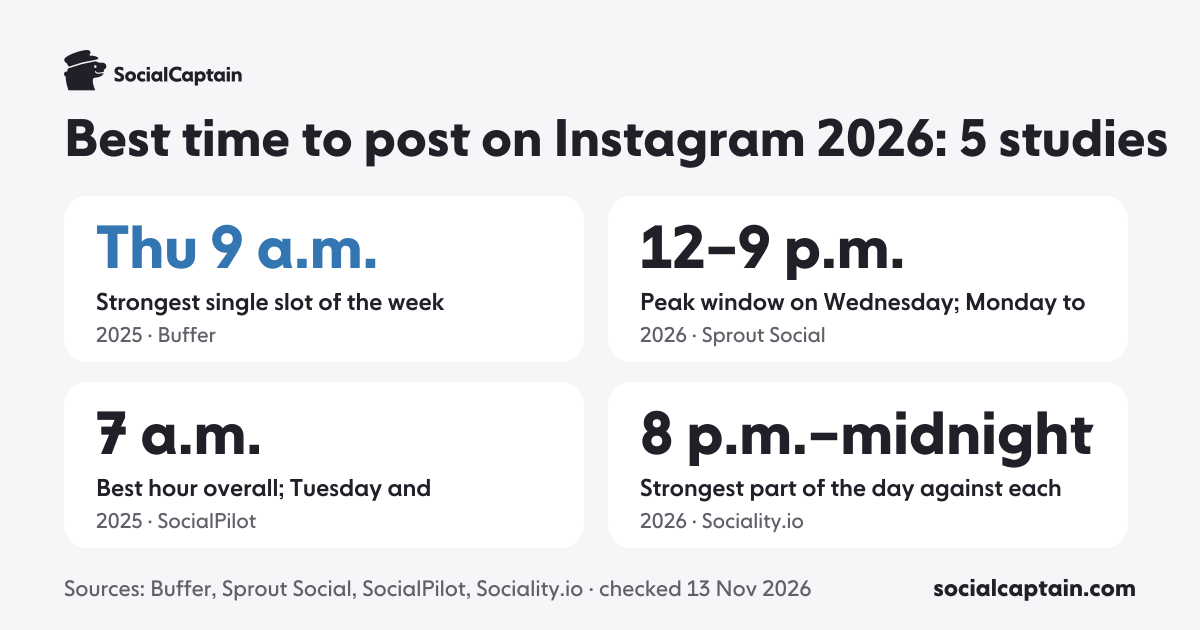
Five recent studies measured Instagram posting times on hundreds of thousands to millions of posts. They disagree on the hour, which is the most useful thing to know about them.
| Study | Published | Data | Best time found | Weakest day |
|---|---|---|---|---|
| Buffer | Sep 2026 | 9.6 million posts, 2024 to 2025 | Thursday 9 a.m.; Wednesday best day | Friday and Saturday |
| Sprout Social | Mar 2026 | Nearly 2 billion engagements, Nov 2025 to Feb 2026 | Monday to Thursday afternoons | Weekends |
| SocialPilot | Feb 2026 | 7 million posts, Feb 2025 to Jan 2026 | 7 a.m.; Tuesday and Wednesday | Saturday |
| Later | Apr 2026 | 6 million feed posts, Jan to Oct 2024 | 5 a.m.; Monday | Saturday |
| Sociality.io | Oct 2026 | 335,210 brand posts, Aug 2025 to Jul 2026 | 8 p.m. to midnight; Sunday 10 p.m. to midnight | No clear weak day |
Sociality.io is the only study that compares each post with the same account's usual post. In its data, 52.0% of posts made between 8 p.m. and midnight beat their account's usual post, against 48.7% between 9 a.m. and 5 p.m., and every day of the week landed between 48.5% and 51.4%. The hour moves results a little; the day hardly at all.
How should you read these studies?
Treat them as places to start testing, not as a schedule. Three things decide whether a study's hour fits you:
- Time zone. Buffer, Sprout Social and Later give local time, SocialPilot calls its hours time-zone-agnostic, and most of Sociality.io's accounts run on UTC. Use your audience's time zone, not yours.
- Account size. Each study mixes small and large accounts in its own way. Buffer uses medians so a few large accounts cannot pull an hour up, and Sociality.io compares each post only with its own account. Your own Insights show only your followers.
- Niche and audience. Each study covers its own customers, not a random slice of Instagram. Buffer itself says results vary by industry, which is why the planner asks for yours.
What is the best day to post on Instagram?
Midweek, in most studies. Buffer's best day is Wednesday, Sprout Social's best days run Monday to Thursday and SocialPilot's are Tuesday and Wednesday, while four of the five studies above rank Saturday among the weakest days. The planner also weights each day for your niche, so its answer changes when you change the niche. If a day looks weak, you do not have to skip it: test it for a few weeks before you drop it.
How do I find my own best posting time?
Your own audience is the best source. Open Instagram Insights, go to the audience section and look at Most active times. Our guide to Instagram Insights shows where to find it. Then run a simple test.
- Pick three slots from the planner and from your Insights.
- Post at those times for 2 to 4 weeks, keeping the content type similar.
- Compare reach and engagement for each slot.
- Keep the slots that win and replace the weakest one.
To compare results fairly, calculate each post's rate with the engagement rate calculator. Keep a note of each post's date, time, format and reach. A simple table is enough, and after a month it shows which slots work for your audience.
Does the time zone matter, and is it different for Reels?
Yes, the time zone matters. The schedule is built around your audience's local time, so if most of your followers live in another country, pick their time zone, not yours. The planner then shows each hour on your own clock so you know when to publish. Do not forget daylight saving changes, which can shift an hour for some audiences.
The planner gives one schedule for all formats. Reels, feed posts and Stories may perform differently, so test Reels separately in Insights. Learn more about formats in our Instagram marketing strategy guide.
How often should I post?
Pick a pace you can keep. In Dash Social's study of 1.5 million feed posts, brands that posted 2 to 3 times a week had the highest engagement rates, and the median brand in Rival IQ's 2026 report posts 3.69 times a week. Use the top 5 slots as your weekly plan, and add more only when you can keep the quality up. A regular rhythm also makes your timing tests easier to read.
Before you schedule: a 5-point timing checklist
- You chose the niche closest to your content.
- You set the time zone of your audience, not your own.
- You checked Most active times in Insights.
- You will test each slot for 2 to 4 weeks.
- You will review Reels separately.