How to Get Verified on TikTok: Requirements and 6 Steps
Quick answer
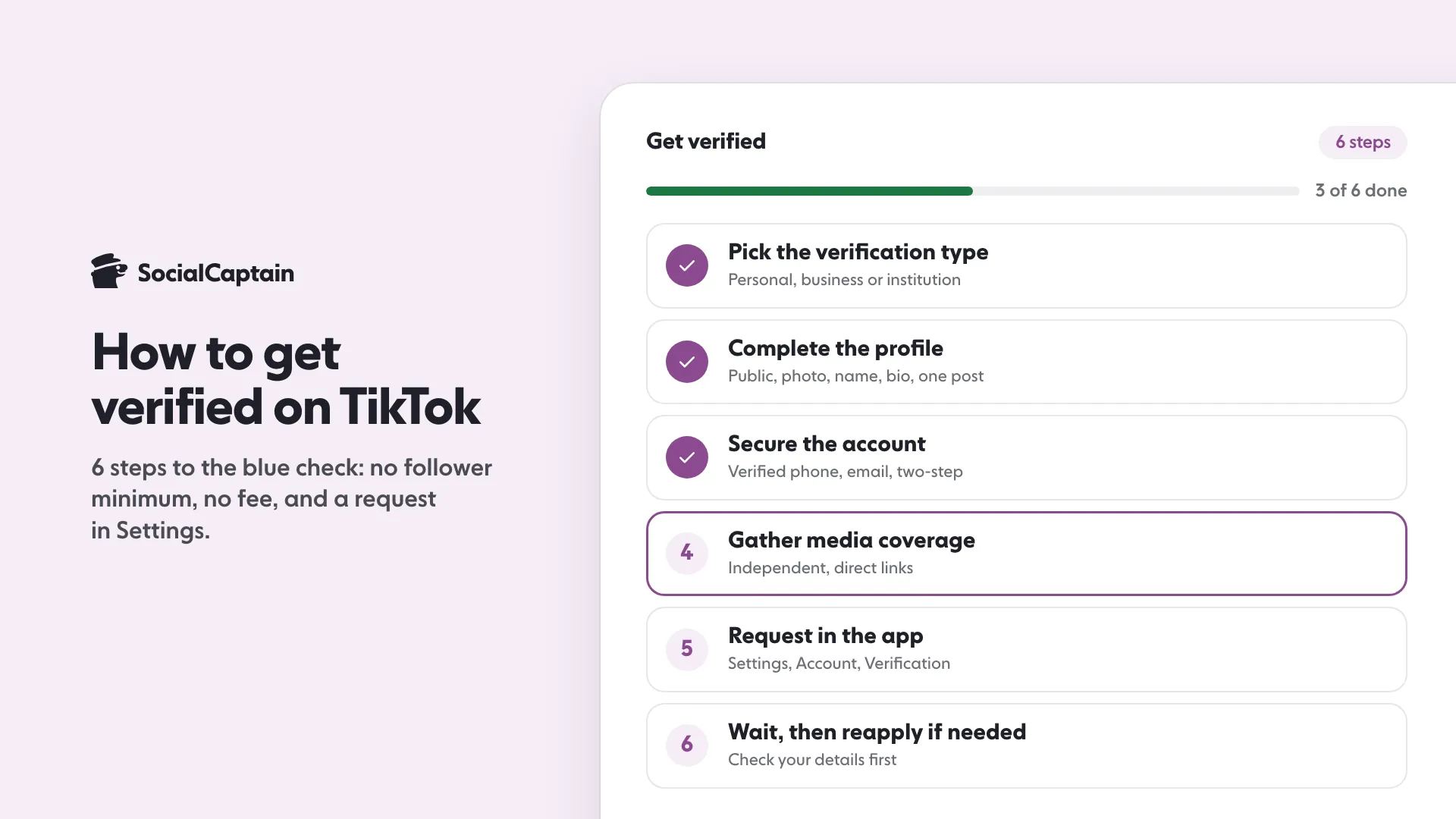
To get verified on TikTok, make your account active, authentic, complete, notable and secure, then tap Profile, Menu, Settings and privacy, Account, Verification. Verification is free and has no follower minimum.
- Choose the right type: personal, business or institution.
- Anyone offering to sell you TikTok verification is not with TikTok.
- Changing your username or account type can remove the badge.
On this page9 sections
To get verified on TikTok, your account must be active, authentic, complete, notable and secure, and you request the badge in the app under Settings and privacy, then Account, then Verification. There is no follower minimum and no fee. TikTok’s Creator Academy says follower count and likes alone do not determine eligibility. This guide gives the 6 steps in order, the 5 requirements as TikTok lists them, and what to do after a rejection. All of it comes from TikTok’s Creator Academy and Help Center, read on 11 November 2026.
What does the TikTok blue check mean?
The blue check mark next to a username is the verified badge. TikTok says it means the platform has confirmed that the account really belongs to the person or brand it represents, so people can tell the real account from a parody or fan account. It is not an endorsement of what the account posts, and TikTok says everyone, verified or not, must follow its Community Guidelines and Terms of Service.
TikTok offers three verification types, based on who the account represents:
- Personal: creators, public figures, artists, athletes, journalists and other notable individuals.
- Business: companies, brands, media organizations, entertainment properties, sports teams and other commercial organizations.
- Institution: government bodies, schools, universities, charities, NGOs and other public or non-profit organizations.
What are the 5 requirements?
TikTok reviews several factors when deciding whether an account is eligible. These are the five it names:
| Requirement | What TikTok says |
|---|---|
| Active | The account is in active use: you have logged in recently and published at least one public post |
| Authentic | The account represents a real person, business or organization, and the name, profile, content and submitted materials match that identity |
| Complete | The account is public and has a profile photo, an account name, a bio and at least one public post |
| Notable | The person, business or organization is publicly known, based on independent media coverage and other reliable public information |
| Secure | The account has a verified phone number and email address, and two-step verification is turned on |
What are the 6 steps to get verified?
Step 1: Pick the right verification type
Choose personal, business or institution to match the account. TikTok warns that selecting the wrong type may delay the review or require a new application.
Step 2: Complete the profile
Make the account public. Add a profile photo, an account name and a bio that clearly shows who or what the account represents, and publish at least one public post. If you are still choosing a name, the TikTok username generator can help, and it is worth deciding before you apply because changing your username later removes the badge.
Step 3: Secure the account
Verify your phone number and email address, and turn on two-step verification. These are listed under the Secure requirement, so an account without them is not ready.
Step 4: Gather independent media coverage
Notability is judged partly on coverage in the press. TikTok says strong coverage generally comes from an independent and recognized outlet, focuses mainly on you, has a publication date and is available to review. Sponsored content, paid promotions, advertisements and press releases do not count, and neither do personal blogs or social media posts. Submit direct links to the original articles, not search results, screenshots or media homepages.
Step 5: Submit the request in the app
- Open the TikTok app and tap Profile at the bottom.
- Tap the Menu icon at the top.
- Choose Settings and privacy.
- Tap Account, then Verification.
- Follow the steps in the app to send the request, with your media links if you have them.
Step 6: Wait, and reapply if needed
TikTok does not give a review time on the Creator Academy page. If your first request is not accepted, you can apply again once you are eligible to reapply. Before you do, check that your account information and supporting materials are accurate, complete and up to date. TikTok also says it will never DM or email you asking you to apply for a badge, so treat any such message as not from TikTok.
Is verification the same as a Verified Business Account?
No, and the difference matters if you run a brand. TikTok’s account types page says that verifying a business account is a separate process from receiving a verified badge. A Verified Business Account unlocks business tools, and TikTok may ask you to verify the business to keep them. The blue check is the badge for notability. Our TikTok business account vs personal guide explains what a business account changes.
Can you buy TikTok verification?
No. TikTok states that verification is completely free and to watch out for anyone claiming they can sell it. A badge shown inside a bio, rather than next to the username, is not a verified account, because only TikTok applies badges and always in the same place. The same logic applies to Instagram, where the route is different: see how to get verified on Instagram.
How can you lose the badge?
TikTok says there is currently no way to remove a verification badge by request. It may remove the badge in these cases:
- The account changes hands, and the new owner needs their own verification.
- You change your username and need to reapply.
- You switch account type, for example business to personal, and need a new application.
- The account has repeated or serious violations of the Community Guidelines or Terms of Service.
What if you are not eligible yet?
Notability takes time, and nothing on TikTok’s pages suggests you can speed it up. What you can do is build the account properly: post consistently, keep the profile complete and secure, and earn real coverage. Our guides on how to get more followers on TikTok and the TikTok Creator Rewards Program cover the growth and earning side. To add real people to your audience while you build toward verification, see the TikTok followers page.
FAQ
How many followers do you need to get verified on TikTok?
There is no follower minimum. TikTok’s Creator Academy says follower count and likes alone do not determine eligibility, and that verification is not a popularity contest.
Does TikTok verification cost money?
No. Verification on TikTok is free. TikTok says anyone claiming they can sell you a verification is not with TikTok.
How do you request verification on TikTok?
In the app, tap Profile, then the Menu icon, then Settings and privacy, then Account, then Verification, and follow the steps. Choose the type that matches your account: personal, business or institution.
Why was my TikTok verification request rejected?
TikTok does not list reasons on the pages we read, but it says selecting the wrong type can delay the review and that sponsored articles, press releases and search results do not count as media coverage. You can apply again once you are eligible to reapply.
Can you lose a TikTok verified badge?
Yes. TikTok may remove it if the account changes hands, if you change your username, if you switch account type, or after repeated or serious Community Guidelines violations.
Is a Verified Business Account the same as a blue check?
No. TikTok says verifying a business account is a separate process from receiving a verified badge. Business verification unlocks business features, while the badge confirms the account belongs to the person or brand it represents.
Sources
Related guides
Accounts and verification
How to Get Verified on Instagram: 6 Steps and Requirements
Accounts and verification
TikTok Business vs Personal Account: 7 Differences
Accounts and verification
How to Remove Followers on Instagram: 3 Ways, Including Bulk
Written by Luca Fenwick
TikTok editor
Luca Fenwick covers TikTok on the SocialCaptain blog: followers, views, the For You feed, bios, video formats and the creator programs. Each guide follows TikTok's own help pages and announcements, and lists its sources at the end.
All articles by Luca Fenwick


