Instagram Creator vs Business Account: 8 Differences
Quick answer
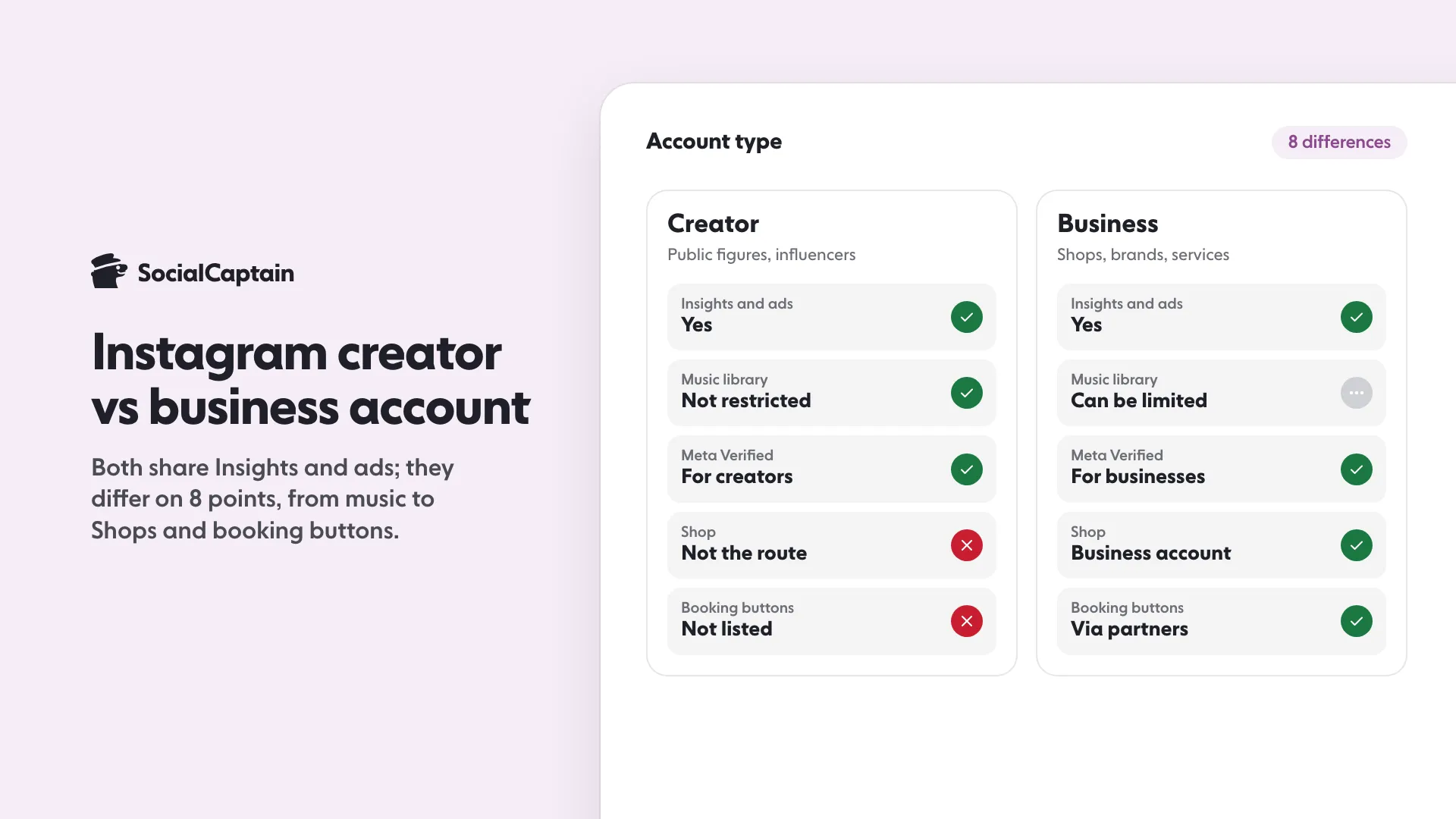
Instagram creator and business accounts are both professional accounts with the same core tools: Insights, ads, a contact button and scheduling. They differ on 8 points, mainly music access, Shops, booking buttons and Meta Verified. Neither has a documented reach advantage.
- Switching is free, and followers, posts and username stay the same.
- A private account becomes public when you switch to either type.
- Choose business for a Shop or booking buttons, creator for trending music.
On this page10 sections
Instagram creator and business accounts are both professional accounts, and they share the same core tools: Insights, ads, a contact button, an inbox with message requests, and scheduling through approved tools. They differ on 8 points, mainly music library access, Shops, booking buttons, Meta Verified and Creator Marketplace. Neither type has a documented reach advantage, and you can switch between them at any time. Use the list below to decide which one fits your account.
What is a creator account?
A creator account is a professional account type for public figures, content producers, artists and influencers. You get Insights, the professional dashboard, a category label and a contact button, plus access to creator programs such as Meta Verified for creators.
What is a business account?
A business account is a professional account type for shops, local businesses, brands and service providers. It has the same core tools as a creator account, and it is the type Instagram points to for Shops and for booking and ordering buttons.
Instagram’s name for both is “professional account”. When you switch from a personal profile, you choose the type in the last step, and the category you pick does not decide it.
What do both account types share?
Before the differences, note what is identical:
- The professional dashboard and Insights on followers and posts.
- The ability to run ads.
- A contact button that can show email, phone number or directions.
- A message inbox split into Primary, General and Requests.
- Publishing and scheduling through tools that use Meta’s official API for professional accounts.
- Public visibility. A professional account cannot be private, and a private account becomes public when you switch.
For help reading the analytics both types have, see Instagram Insights: 9 Metrics to Track and What They Mean.
Which 8 features differ?
| # | Area | Creator account | Business account |
|---|---|---|---|
| 1 | Intended users | Public figures, artists, influencers | Shops, local businesses, brands, service providers |
| 2 | Category labels | Creator-style, such as Digital creator or Artist | Business-style, such as Restaurant or Clothing store |
| 3 | Licensed music library | Not named in Meta’s restriction | Certain business accounts have no access and can use Meta’s Sound Collection |
| 4 | Audio on existing Reels after switching | No Instagram page found | No Instagram page found; check before you switch |
| 5 | Meta Verified | Eligible for Meta Verified for creators | Directed to Meta Verified for businesses |
| 6 | Creator Marketplace projects | Browsing projects is listed for creator accounts | Meta’s pages disagree on whether business accounts can use it |
| 7 | Shop | Not the documented route | Needs a business account in your business portfolio |
| 8 | Booking and order buttons | Not listed for creators | Offered through partner providers |
The table reflects Instagram’s Help Center pages as read on 11 November 2026, and Instagram changes these rules. Check the setup screen in your own app before you decide. Items 3, 4 and 8 are the ones that change most often.
1 and 2: Who the type is for
The type is mainly a label for your purpose. Pick the type that describes how you use the account.
3 and 4: Music
Music matters for Reels. Instagram’s Help Center says the licensed music library is meant for personal, non-commercial use, and that certain business accounts and certain types of posts do not have access to it. Those accounts may still use Meta’s Sound Collection, which it describes as over 14,000 royalty-free songs and sounds that can be used commercially. We found no Instagram page that says what switching to a business account does to audio on Reels you already posted, so check before you switch. If trending audio is part of your plan, choose a creator account or test the library before you switch.
5: Verification
Meta Verified for creators lists creator and personal profiles as eligible. Businesses go through a separate process. Our guide How to Get Verified on Instagram: 6 Steps and Requirements covers both. Meta also limits how often you can change details such as account type before you apply, so avoid switching back and forth.
6: Creator Marketplace
Meta’s pages are not consistent here. The eligibility page says Creator Marketplace is available to business and creator accounts and asks for a professional, public account with at least 1,000 followers and an age of 18 or more, while the page on finding projects says that feature is only available to creator accounts. Check which view your own account gets before you rely on it.
7: Shop
If you plan to sell through an Instagram Shop, you need a business account connected to your business portfolio.
8: Booking and order buttons
Buttons such as Book now or Order food are designed for businesses and delivered through partner providers. A creator account does not get them in Instagram’s documentation we found.
Which account suits you?
Use this short rule:
- Choose creator if you are a person with a public profile, you rely on trending music in Reels, or you mainly want to browse Creator Marketplace projects, which some Meta pages limit to creator accounts.
- Choose business if you sell products through a Shop, take bookings or orders, or run the account for a company.
- Choose either if your needs are only Insights, ads and scheduling. They are the same on both.
If you are unsure, start with creator and switch to business when you need a business-only feature. Switching is free, but note the music and marketplace effects above.
How do you switch?
In the app:
- Open your profile and tap the menu to open Settings and activity.
- Tap Account type and tools.
- For a personal account, tap Switch to professional account, choose a category, then choose Creator or Business.
- For a professional account, tap Account type, then Switch account type, and pick the other type.
On a computer, open Settings, choose Creator tools and controls or Business tools and controls, and select Switch account type.
Know what changes:
- A private account becomes public and accepts pending follow requests.
- Switching back to personal can remove some professional tools. Read the screen the app shows before you confirm.
Your followers, posts and username stay the same. After switching, check your contact details and bio, and use the free Instagram bio generator if the new type needs a new bio.
Does the account type change reach?
Not according to anything Instagram has published. Its ranking explainer lists signals such as how many people like, comment, share and save a post, how quickly, and your history with the poster, and account type is not among them. Choose the type for features, not for reach.
If your goal is more reach, work on content and the profile first. See How to Get More Instagram Followers: 12 Tactics That Work, or look at SocialCaptain’s pricing for real followers from your niche, on public profiles of either type.
What should you check before you switch?
Take a note of your contact details and category first, so you can restore them if the switch does not suit you. You can switch back at any time.
FAQ
What is the difference between a creator and a business account on Instagram?
Both are professional accounts with the same core tools: Insights, ads, a contact button and scheduling through approved tools. The differences are narrow: music library access, Shops and booking buttons favor business accounts, while Meta Verified for creators is for creator accounts. Meta’s pages disagree on whether business accounts can browse Creator Marketplace projects.
Which is better for growth, creator or business?
Neither type has a documented reach advantage. Instagram’s ranking explainer lists signals such as likes, comments, shares and saves, and account type is not among them.
Can I switch between creator and business?
Yes, at any time and for free. In the app, open Settings and activity, then Account type and tools, then Account type, then Switch account type.
Do creator and business accounts get Insights?
Yes. Insights is available to both professional account types.
Can a professional account be private?
No. A professional account has to be public, and a private account becomes public when you switch.
Which account should a small shop choose?
A business account, mainly because Instagram’s Shop route and booking buttons are designed for businesses. A shop that is run by one public person can still choose a creator account if music access matters more.
Sources
- Eligibility requirements for Meta Verified creator subscriptionshelp.instagram.com
Related guides
Accounts and verification
How to Get Verified on Instagram: 6 Steps and Requirements
Accounts and verification
TikTok Business vs Personal Account: 7 Differences
Accounts and verification
How to Get Verified on TikTok: Requirements and 6 Steps
Written by Clara Ivens
Instagram growth editor
Clara Ivens covers Instagram growth on the SocialCaptain blog: followers, Reels, hashtags, bios, captions and how reach works. Each guide follows Instagram's own help pages and announcements, and lists its sources at the end.
All articles by Clara Ivens


