Add a Link to Your TikTok Bio: 4 Steps, 1,000 Follower Rule
Quick answer
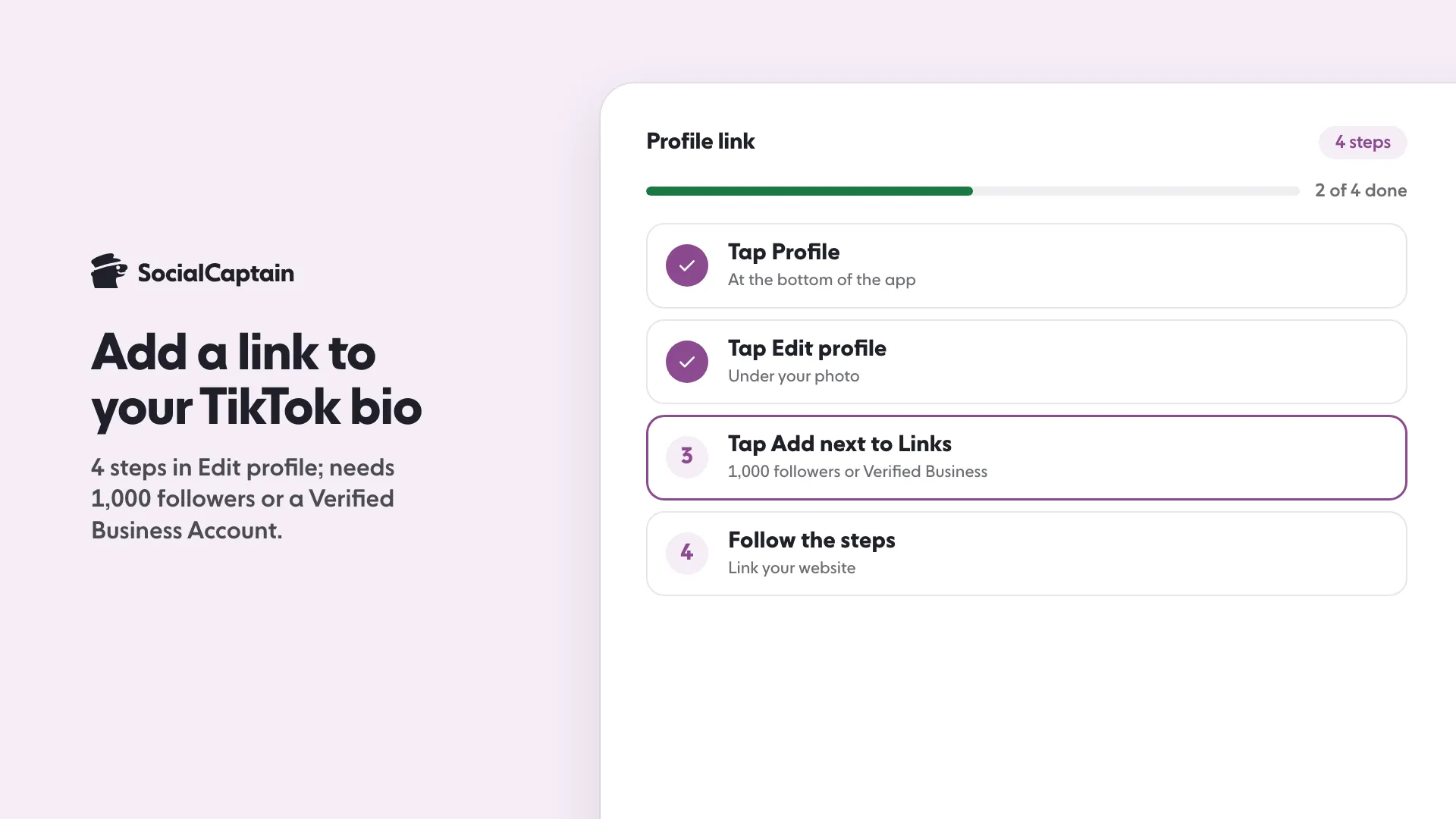
To add a link to your TikTok bio, tap Profile, tap Edit profile, tap Add next to Links and follow the steps. You need at least 1,000 followers or a Verified Business Account.
- Business verification can take up to 5 business days.
- TikTok bios cannot exceed 80 characters.
- Link directly to one page; redirect chains may trigger an open-in-browser prompt.
On this page9 sections
To add a link to your TikTok bio, tap Profile, tap Edit profile, tap Add next to Links and follow the steps. TikTok allows this if you have at least 1,000 followers or a Verified Business Account, so under that follower count the business route is the way in. This guide gives the 4 steps, how the business route works, how to fix a missing Links option and what makes a good link. All of it is from TikTok’s Help Center account and profile pages, read on 11 November 2026.
Who can add a link to their TikTok bio?
TikTok’s Help Center page “Adding a website link to your profile” says you can add a link to a website if you have at least 1,000 followers, or if you have a Verified Business Account. Its account types page states the same for each type: General (personal) accounts with at least 1,000 followers can post a website link, and Verified Business Accounts can post a website link to promote a website. You can also choose to add a Lemon8 account to your profile, where available.
When someone taps a link on a profile, TikTok’s in-app browser opens the page.
What are the 4 steps to add the link?
- In the TikTok app, tap Profile at the bottom.
- Tap Edit profile.
- Next to Links, tap Add.
- Follow the steps to link your website.
The link then sits on your profile. If you want to remove or change it, return to Edit profile and open Links.
How do you get a link with fewer than 1,000 followers?
Switch to a Verified Business Account. TikTok says Verified Business Accounts can post a website link on their profile, with no follower minimum stated. To switch:
- In the TikTok app, tap Profile at the bottom.
- Tap the Menu button at the top, then Settings and privacy.
- Tap Account.
- Tap Business verification, then follow the steps.
You submit business information and documents. TikTok says approval may take up to 5 business days, and that you receive an in-app notification and a confirmation email. The process and the required documents may vary by location.
Before you switch, know the trade-offs. A Verified Business Account uses the Commercial Music Library rather than the general music library, has a public profile and is not eligible for the Creator Rewards Program. TikTok also advises against switching back and forth because your verification is not saved. The full comparison is in TikTok business vs personal account. If you would rather reach 1,000 followers, see how to get 1,000 followers on TikTok.
Why is the Links option missing?
Work through these in order:
- Check your follower count. Under 1,000 followers and not a Verified Business Account means the option is not available.
- Check the account type. A Verified Business Account that TikTok asked you to re-verify may have been converted to a General account. TikTok says that if you do not verify when asked, the account may be converted and lose Verified Business features.
- Update the app. Menus change between versions.
- Look in Edit profile. The Links field is there, not in Settings.
- Contact TikTok. If you meet the requirement and the option is still missing, use the Help Center from Settings and privacy.
What makes a good link?
TikTok recommends direct links so people reach the intended page in a few steps. It also uses safety measures that limit browsing external link chains inside the in-app browser, which means a visitor may see a message prompting them to open the page in their device’s browser. A link that goes straight to one page works better than a chain of redirects.
Some ideas for what to link to:
- Your shop or product page
- A page that holds several links, such as one built with the link in bio tool
- A booking or sign-up page
- Your portfolio or newsletter
TikTok also notes that it no longer supports links that open or log you into other social media apps. You can still link to those platforms’ websites.
How do you stay safe with links?
TikTok says that before entering personal information on an external site you should verify the site is legitimate and secure. If you see a suspicious link on someone’s profile, tap the link, tap More options, then tap Report. Do the same check on any link you add: send people only to pages you own or trust.
What else should the bio say?
The link is only half of a profile: the bio tells people why to click it. TikTok’s Help Center says bios cannot exceed 80 characters, so write the call to action in one short line. For examples, see TikTok bio ideas: 60 examples under 80 characters. If you also use Instagram, the equivalent steps are in how to add a link to your Instagram bio, where you can add up to five websites, and the bio writing guide and Instagram captions share the same principles. To bring more viewers to your profile, how to get more followers on TikTok covers the growth side, and pricing shows how SocialCaptain adds real followers who match your niche.
FAQ
How many followers do you need for a link in your TikTok bio?
TikTok’s Help Center says you can add a link to a website on your profile if you have at least 1,000 followers or a Verified Business Account.
Why can’t I add a link to my TikTok bio?
Most often because the account has fewer than 1,000 followers and is not a Verified Business Account. If you meet one of those conditions and still do not see the Links option, update the app and contact TikTok through the Help Center.
How do you add a link to your TikTok bio?
Tap Profile, tap Edit profile, tap Add next to Links and follow the steps to link your website. TikTok’s help page describes the steps in the app.
Can you get a link in your bio with fewer than 1,000 followers?
Yes, with a Verified Business Account. TikTok says Verified Business Accounts can post a website link, and business verification may take up to 5 business days.
Can you link to Instagram or YouTube on TikTok?
You can link to a website, including a page on another platform. TikTok says it no longer supports links that open or log you into other social media apps, but you can still add links that direct people to those platforms’ websites.
Is a link in the bio text clickable on TikTok?
TikTok’s help page describes the link as a profile field added under Links in Edit profile. It does not describe web addresses typed into the bio text as clickable, so use the Links field.
Sources
- Adding a website link to your profile | TikTok Help Centersupport.tiktok.com
- Account types on TikTok | TikTok Help Centertiktok.com
- Changing account bio | TikTok Help Centertiktok.com
Related guides
Bio and captions
Instagram Captions: 150 Ideas in 8 Moods You Can Copy
Bio and captions
TikTok Bio Ideas: 60 Examples Under 80 Characters
Bio and captions
How to Add a Link to Your Instagram Bio: 4 Steps
Written by Luca Fenwick
TikTok editor
Luca Fenwick covers TikTok on the SocialCaptain blog: followers, views, the For You feed, bios, video formats and the creator programs. Each guide follows TikTok's own help pages and announcements, and lists its sources at the end.
All articles by Luca Fenwick


