Instagram Shadowban: 5 Signs, How to Check and 6 Fixes
Quick answer
An Instagram shadowban is a community term for a sudden drop in reach. Instagram's head says shadowbanning is not a thing, but content that breaks the Recommendation Guidelines can be ineligible for recommendation; check Settings, then Account Status.
- Compare non-follower views across your last 10 posts.
- Stop automation and any app that has your login.
- Instagram publishes no duration; judge over several weeks.
On this page7 sections
An Instagram shadowban is the name people give to a sudden drop in reach that they believe Instagram caused in secret. Instagram’s head has said shadowbanning is not a thing, but Instagram does document that content can be made not eligible to be recommended when it breaks the Recommendation Guidelines. This guide gives 5 signs of a reach problem, how to check your Account Status, and 6 fixes.
What is an Instagram shadowban?
“Shadowban” is a community word, not an Instagram feature. People use it when reach falls sharply and the account shows no warning. Instagram has said that followers can still see your posts in their feed, and that what can be limited is whether your content is recommended to people who do not follow you, for example in Explore or Reels recommendations.
So the useful question is not “am I shadowbanned” but “is my content eligible to be recommended, and if it is, why is reach down?” Often the answer is ordinary: a quiet week, a format change or one weak post.
What are the 5 signs?
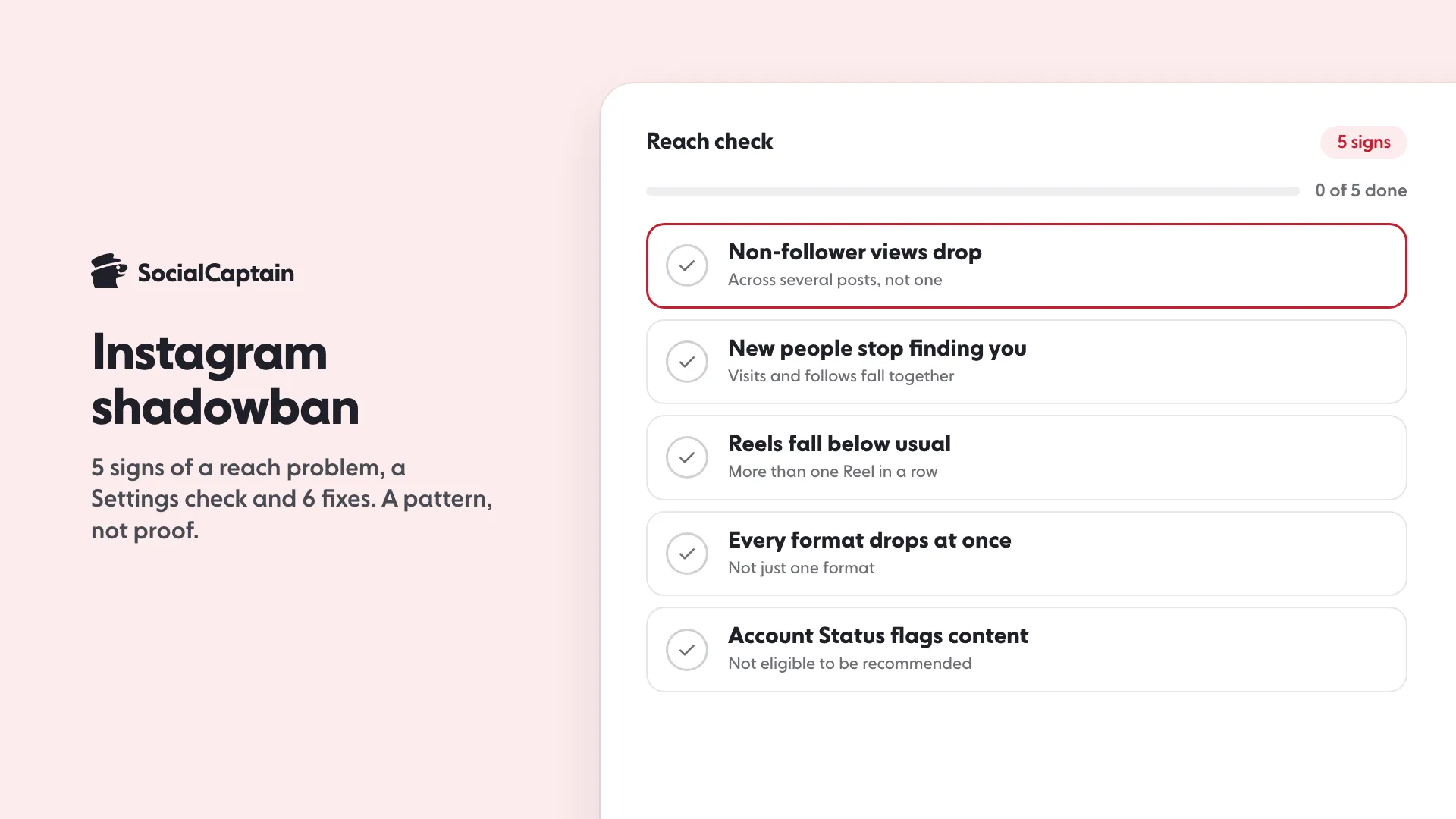
These are signs of a reach problem, not proof of a penalty:
- Views from non-followers drop sharply across several posts, while views from followers stay about the same.
- New people stop finding you. Profile visits and new followers fall in the same weeks as views from non-followers.
- Reels get a fraction of your usual views across more than one Reel in a row.
- Reach falls on every format together, not just one.
- Account Status shows content not eligible for recommendation. This is the only sign that comes from Instagram itself.
One bad post is variation, not a ban. Look for a pattern across your last 10 posts before drawing a conclusion.
How do you check Account Status?
Instagram’s Account Status screen shows professional accounts whether their content can be recommended. Steps:
- Open your profile menu and go to Settings.
- Find Account Status (the label and its position vary by app version).
- Open it and read the recommendation eligibility message.
- If it says some content is not eligible, open the item to see which post and why, and use the review option (it may read Request review or Disagree with decision) if it is offered and you think it is wrong.
If your account is personal, switch to a professional account to see eligibility. If Account Status shows nothing wrong, the drop is more likely normal variation than a limit.
If your question is who looks at your profile, See Who Viewed Your Instagram Profile: 4 Real Options explains what Instagram shows.
Next, open Insights and compare views from followers and non-followers for the last 10 posts. Instagram Insights: 9 Metrics to Track and What They Mean shows where.
Which hashtags or tools cause it?
We cannot point to a documented list of hashtags that cause a reach drop, so we do not name any. What Instagram does document is the rule on automation: its Terms of Use do not allow accessing or collecting information in an automated way without Instagram’s express permission, and they bar using other users’ login credentials. Tools that follow, like or comment for you, or that ask for your password, put the account at risk. Instagram Bots: 5 Things They Do and the Risks of Each explains how, and Instagram Follow/Unfollow: Does It Work? 5 Limits covers the follow and unfollow routine.
The Recommendation Guidelines are Instagram’s own list of what makes content ineligible for recommendation, so read them before you decide what to change.
What are the 6 fixes?
- Stop all automation. Disconnect any app that has your login and change your password.
- Check Account Status and remove or edit content it flags. Request a review if it is offered.
- Post original content. Make your own photos, videos and captions rather than reposting.
- Use up to five relevant hashtags. Instagram caps posts at five and warns that irrelevant or generic tags can hurt performance.
- Keep a steady, human pace. Post on a schedule you can hold and reply to comments yourself.
- Change one thing at a time and wait. Compare 10 posts before and after so you know what helped.
How long does it last?
Instagram does not publish a duration, so no one can honestly give you a number. If the cause was a flagged post, removing it and requesting a review is the route Instagram offers. If the cause was ordinary variation, reach usually moves back as you post consistent content. Judge the result over several weeks of posts, not days.
For what drives reach in the first place, read Instagram Algorithm 2026: 5 Ranking Signals Explained. SocialCaptain’s plans add real, targeted followers through methods that do not need your password, which helps content reach the right people while you fix the rest.
FAQ
What is an Instagram shadowban?
A community term for a sharp, unexplained drop in reach. Instagram’s head has said shadowbanning is not a thing, but content can be made not eligible to be recommended if it breaks the Recommendation Guidelines.
How do you know if you are shadowbanned on Instagram?
Check Account Status in Settings for recommendation eligibility, and compare views from non-followers across your last 10 posts. A pattern across many posts matters, not one weak post.
How do you fix an Instagram shadowban?
Stop automation, remove content flagged in Account Status and request a review, post original content, use up to five relevant hashtags, keep a steady pace and compare results over 10 posts.
Can automation tools cause reach problems?
They can put the account at risk. Instagram’s rules do not allow automated access without permission, and tools that ask for your password hand a third party control of the account.
How long does a shadowban last?
Instagram publishes no duration. Fix the cause, request a review if offered, and judge the result over several weeks of posts.
Related guides
Algorithm and reach
Instagram Algorithm 2026: 5 Ranking Signals Explained
Follower growth
Instagram Follow/Unfollow: Does It Work? 5 Limits
Growth services
Instagram Bots: 5 Things They Do and the Risks of Each
Written by Clara Ivens
Instagram growth editor
Clara Ivens covers Instagram growth on the SocialCaptain blog: followers, Reels, hashtags, bios, captions and how reach works. Each guide follows Instagram's own help pages and announcements, and lists its sources at the end.
All articles by Clara Ivens


