How to Increase Instagram Reach: 10 Fixes for Low Reach
Quick answer
To increase Instagram reach, post original content, export Reels without watermarks or borders, make posts worth sharing and saving, use Collab posts and search keywords, and check Account Status. Reach counts unique accounts that saw your content at least once.
- Account Status shows whether your content can be recommended to non-followers.
- Reels and Explore reach non-followers most.
- Fans who add you to Favorites see your content higher in their feeds.
On this page8 sections
To increase your Instagram reach, make original content that people share and save, export Reels clean, use Collabs and search keywords, and check Account Status for recommendation eligibility. Those are 4 of the 10 fixes below, and every one comes from Instagram’s own explainers and help pages. Reach is the number of unique accounts that saw your content at least once, so growing it means being shown to more people, and above all to people who do not follow you yet.
What does Instagram reach mean?
Reach counts people, not views, so one person watching a Story twice adds two story views but one account to your reach. Instagram’s help center defines it as the number of unique accounts that have seen a post or story at least once, and notes that it differs from impressions, which can include multiple views by the same account. It also says the reach metric is estimated, so expect small differences between screens.
In the app you will see this under different names depending on the content type, with “Viewers” for the headline number in Instagram’s creator pages. The idea is the same: how many accounts did the content get shown to. The useful split is between followers and non-followers. Instagram’s creator guidance says you can break Accounts Reached into those two groups and track it over time to see which content reaches new people.
Why is my Instagram reach so low?
Instagram has no single algorithm. Its ranking explainer says each part of the app, Feed, Stories, Explore and Reels, uses its own ranking, tailored to how people use it. So low reach has different causes in different places. What the published pages let you check:
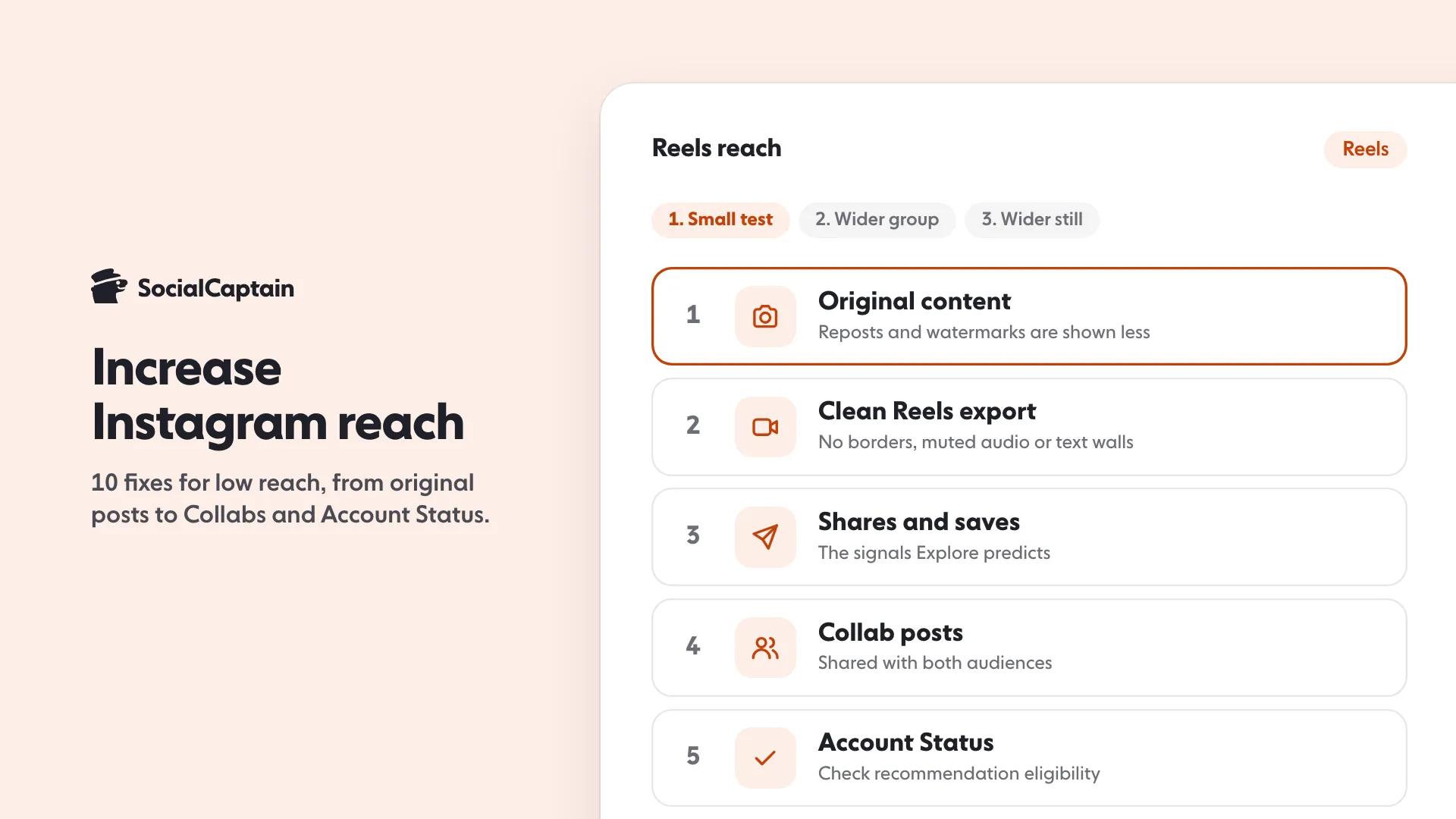
- The content is not original. Instagram says it is less likely to recommend reposts of a Reel, content with watermarks, and accounts that regularly reshare others’ content.
- The Reel is shown less. The explainer lists low-resolution or watermarked Reels, muted Reels or Reels with borders, Reels that are mostly text, and Reels already posted on Instagram.
- It does not meet the Recommendation Guidelines. Instagram says such content can still reach followers in Feed and Stories but is not recommended to non-followers in places like Explore and Reels.
- People do not react. Recommendation signals include how many people, and how fast, like, comment, share and save a post.
Which 10 changes raise reach?
1. Post original content
Instagram’s creator tips tell you to post original content, and the ranking explainer names reposts among the Reels it shows less. If you want to use someone else’s idea, use the Remix tool rather than a re-upload.
2. Remove watermarks and borders
A watermark from another app, a border around the video or a muted track puts a Reel on the shown-less list. Export clean from your editor and keep the sound on. Our Instagram Reels size guide covers the export.
3. Keep text light on Reels
Mostly-text Reels are on the same list. Put the point in the footage and keep on-screen text short. The Reels safe zone checker shows where captions can sit.
4. Make posts people share and save
Instagram says Explore predicts likes, saves and shares, that post popularity matters much more in Explore than in Feed or Stories, and that for Reels it predicts whether you will reshare, watch to the end, like or visit the audio page. Build each post around one thing worth sending to a friend or keeping.
5. Use Collab posts
A Collab shares one post with both accounts’ audiences. Instagram’s creator tips say Collab posts can be recommended in Reels, Explore and Feed. Instagram collab posts: how they work in 5 steps shows the setup.
6. Put search keywords in the caption and bio
Instagram’s creator tips say to add relevant keywords to your content, caption, bio and hashtags so that people can find you in Search. Name the topic in plain words.
7. Use a few specific hashtags
Instagram’s creator tips list hashtags among the places for relevant keywords so people can find you in Search, and the Help Center says you can use up to 5 tags on a post. We found no Instagram page that says more tags raise reach. Pick 3 to 5 that name exactly what the post is about. Our hashtag generator builds sets of 5, and banned Instagram hashtags: how to check one in 4 steps shows how to check each tag first.
8. Ask your fans to use Favorites
Instagram’s creator tips suggest asking your top fans to add you to Favorites, which Instagram says makes your content show up higher in their feeds. It is a small, direct way to reach the people who already like you.
9. Check Account Status
Account Status shows whether your account or content is eligible to be recommended to non-followers. If it is not, Instagram says to edit or delete the content, or request another review. Tap Profile, then Menu, then Account Status.
10. Post when your followers are on the app
Instagram lists timing among the post information used to rank Feed. Pick two or three time slots, post similar content in each and compare. Our free best time to post tool gives starting hours by day and time zone.
Which format reaches non-followers most?
Reels, then Explore. Instagram’s explainer says Reels is built for entertainment and mostly shows content from accounts you do not follow. Explore is built from posts by accounts you do not follow, based on what you have liked, saved, shared and commented on. Feed blends followed accounts with recommendations, and Stories come from accounts a person follows.
That does not mean you should stop posting anything else. Feed and Stories are where followers see you, and a follower who reacts sends the signals the other places use. The mix matters, and Reels vs posts on Instagram: 6 differences compares them, and Instagram content strategy: 4 pillars and a 30-day calendar plans the mix.
How do you read reach in Insights?
Open Insights from your profile, or from the Professional dashboard on a professional account. The creator guidance says Account Insights track growth through views, engagement and followers, and Content Insights give metrics for single posts. Two views matter for reach:
- Viewers or accounts reached over a time frame. Growth means your content is being shown to more people.
- Content reach split by followers and non-followers. Instagram says this shows which content type is best at getting you discovered by new people.
Look at shares, comments and follows next to it. Instagram says shares show how valuable or relatable your content is and amplify reach to new audiences, and that follows show you are reaching new people who want more. Instagram Insights: 9 metrics to track and what they mean goes through them one by one, and brands read the same numbers when they pick creators, as How to get brand deals on Instagram: 7 steps and a media kit explains.
Does posting time change reach?
Possibly, in Feed. Instagram says Feed uses recent posts from accounts you follow and lists post timing among the signals. The signals Instagram lists for Reels and Explore are mostly about the content and how people react to it, and timing is not among them. Treat the best-time tool as a starting point, and let your own Insights decide.
If you want to reach more real people who match your topic while you work on content, SocialCaptain shows your profile to a chosen audience of real people from your niche, country, language and interests, never bots. For the full list of ranking signals, read Instagram algorithm 2026: 5 ranking signals explained, and for Reels that stall, why Reels get low views.
FAQ
What does reach mean on Instagram?
Reach is the number of unique accounts that saw a post or story at least once. Instagram’s help center says it differs from impressions, which can include several views by the same account, and that the reach metric is estimated.
Why is my Instagram reach so low?
Common causes are reposted or watermarked content, low-resolution Reels, content that does not meet the Recommendation Guidelines, and posts that earn few likes, comments, shares and saves. Check Account Status to see whether your content is eligible for recommendation.
Which format reaches non-followers the most?
Reels. Instagram says Reels come mostly from accounts you do not follow, and Explore is also built from posts by accounts people do not follow. Feed and Stories lean on accounts people already follow.
Are hashtags a way to raise reach?
Not necessarily. Instagram’s creator tips list hashtags as one place to put relevant keywords so people can find you in Search, and its Help Center says you can use up to 5 tags on a post. We found no Instagram page that says more tags raise reach, so use a few specific ones.
Does posting time change reach?
It can in Feed. Instagram lists the timing of a post among the post information it uses to rank Feed, and says Feed favours recent posts from accounts you follow. Test two or three time slots and compare reach from followers.
Sources
- Instagram Ranking Explainedabout.instagram.com
- Tips for Improving Your Reachcreators.instagram.com
- Understand Instagram Insightscreators.instagram.com
- Instagram Insights in Commerce Managerhelp.instagram.com
- Check your Account Status on Instagramhelp.instagram.com
- Use hashtags on Instagramhelp.instagram.com
Related guides
Algorithm and reach
Instagram Algorithm 2026: 5 Ranking Signals Explained
Algorithm and reach
How to Get More Instagram Views: 8 Fixes for Posts, Stories
Follower growth
Instagram Collab Posts: How They Work in 5 Steps
Written by Clara Ivens
Instagram growth editor
Clara Ivens covers Instagram growth on the SocialCaptain blog: followers, Reels, hashtags, bios, captions and how reach works. Each guide follows Instagram's own help pages and announcements, and lists its sources at the end.
All articles by Clara Ivens


