Instagram Collab Posts: How They Work in 5 Steps
Quick answer
An Instagram collab post is one feed post, carousel or Reel that up to six accounts co-author. Tap Tag people, then Invite collaborators, add up to five accounts and publish; it appears on each collaborator's profile once they accept.
- Likes, comments and views are pooled into one count on every profile.
- Collab posts are not available for Stories.
- Choose partners whose audience matches yours in interest and country.
On this page8 sections
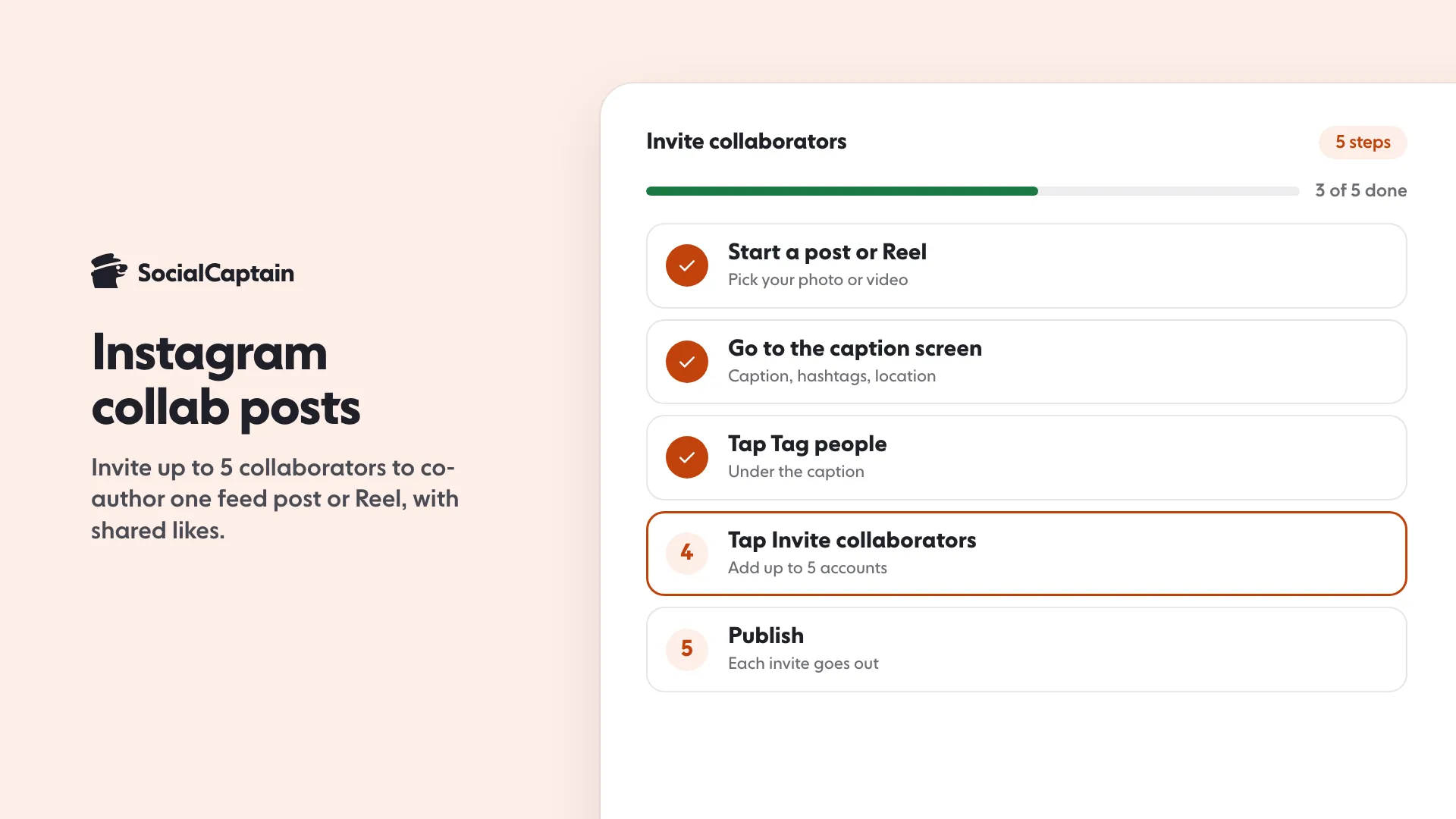
An Instagram collab post is one feed post or Reel that two or more accounts co-author. You create it in 5 steps: start a post or Reel, go to the caption screen, tap Tag people, tap Invite collaborators and add up to five accounts, and publish. The post shows on your profile at once and on each collaborator’s profile after they accept, with one shared set of likes, comments and views.
What is a collab post?
A collab post lists several accounts as authors of the same post. It appears on every author’s profile grid and can be shown to every author’s followers, instead of one account posting and others tagging it. Because it is a single post, the engagement is pooled into one count that every profile shows.
Collab posts work on feed posts, carousels and Reels. They are not available for Stories.
How do you create one?
These are the 5 steps in the app. Menu labels shift between versions, so look for the same words if a screen differs.
- Start a post or Reel. Tap the plus button, choose your photo, carousel or video, and edit it as usual.
- Go to the caption screen. Write your caption and add your hashtags and location.
- Tap Tag people.
- Tap Invite collaborators and search for the accounts. You can add up to five collaborators, which makes up to six authors in total.
- Publish. The invite goes out to each account, and the post is live on your profile straight away.
To add a collaborator after publishing, open the post, tap the three dots, tap Edit, then Tag people and Invite collaborators. If the option is missing on your account, publish a new post and invite the collaborators before sharing.
How does the collaborator accept?
Each invited account gets a notification. The collaborator reviews the post and accepts or declines. Until they accept, the post appears only on your profile and they are not listed as an author. If an invitee declines, they may remain tagged but are not a co-author and the post does not appear on their profile grid.
How are likes and followers shared?
Likes, comments and views are pooled into one count that appears the same on every author’s profile. Everyone who accepted can see the comments and reply from their own account.
What is not shared is your follower count. A collab post puts your content in front of the other author’s followers, and some of those people may follow you afterwards. There is no guarantee, so do not expect a fixed number.
What are the limits?
Three limits are worth knowing, and the Instagram app is the final word on any of them:
- Up to five collaborators per post, six authors in total.
- Feed posts, carousels and Reels only. Not Stories.
- The invitee must accept. Until then the post is yours alone.
What should you agree on before you invite someone?
A collab post puts both names on one piece of content, so settle the basics first:
- The message. Agree the idea, the caption and the call to action, since only one account writes the caption.
- The day and time. The invite goes out when you publish, so tell your partner when to expect it and to accept quickly.
- What each side shares afterwards. Decide whether each account will also post a Story pointing to the collab.
- How you will measure it. Note both follower counts before the post and a week after.
A short message covering these four points saves a lot of back and forth.
How do you use collabs to grow?
Four ways work well:
- Pair with a neighbour in your niche. A florist and a wedding photographer share an audience without being rivals.
- Co-create a series. A monthly joint Reel gives both audiences a reason to come back.
- Run a giveaway together. Two accounts share the prize and the audience. The rules in Instagram Giveaway: How to Run One in 8 Steps With Rules apply.
- Feature a customer or a creator. With their agreement, a collab with someone who already uses your product puts real people in front of new viewers.
Pick partners whose audience matches yours in interest and country. A partner with a larger audience that does not care about your topic brings views, not followers. How to Get More Instagram Followers: 12 Tactics That Work puts collabs next to the other tactics, and Instagram Algorithm 2026: 5 Ranking Signals Explained shows why shared engagement helps a post travel.
To measure the effect, check your follower count and profile visits before the collab and a week after, in Instagram Insights. If you want a bigger audience of real, targeted followers to bring to your collabs, SocialCaptain’s plans add people who match your niche, country, language and interests.
FAQ
What is an Instagram collab post?
A feed post or Reel co-authored by two or more accounts. It appears on every author’s profile and is shown to each author’s followers, with one shared set of likes, comments and views.
How many people can you add to a collab post?
Up to five collaborators, so up to six authors in total.
Do collab posts work on Stories?
No. Collab posts are available for feed posts, carousels and Reels, not Stories.
Are likes and comments shared on a collab post?
Yes. They are pooled into one count that shows the same on every author’s profile, and each author can reply to comments from their own account.
Can you add a collaborator after posting?
Often yes. Open the post, tap the three dots, then Edit, Tag people and Invite collaborators. If the option is missing, publish a new post and invite them before sharing.
Related guides
Follower growth
How to Get More Instagram Followers: 12 Tactics That Work
Algorithm and reach
Instagram Algorithm 2026: 5 Ranking Signals Explained
Follower growth
Instagram Giveaway: How to Run One in 8 Steps With Rules
Written by Clara Ivens
Instagram growth editor
Clara Ivens covers Instagram growth on the SocialCaptain blog: followers, Reels, hashtags, bios, captions and how reach works. Each guide follows Instagram's own help pages and announcements, and lists its sources at the end.
All articles by Clara Ivens


