TikTok Shadowban: 5 Signs, How to Check and What Helps
Quick answer
TikTok does not use the word shadowban. It documents For You feed ineligibility, where some content is not recommended there. Check for it in each post's Analytics notification, your Inbox and Account check, because low views alone prove nothing.
- Ineligible posts stay on your profile but may be harder to find.
- You can appeal from the post's Analytics notification.
- No outside shadowban checker can see TikTok's internal status.
On this page10 sections
A TikTok shadowban is the name creators give to a sudden loss of reach that they believe TikTok applied in secret. TikTok does not use the word. What it documents is For You feed ineligibility: some content is not recommended in the For You feed, and an account that posts a lot of such content can be made harder to find. This guide gives 5 signs, the checks inside the app and 6 things that help.
Does TikTok have a shadowban?
Not by that name. A TikTok spokesperson has said the platform does not shadow ban creators and that action against an account follows repeated guideline violations, with the creator notified. What TikTok’s Community Guidelines do describe is the For You feed (FYF) eligibility standards. Content under those standards is ineligible for the FYF, which means it is not recommended there.
The effect is narrower than a ban:
- The post stays on your profile and can still be found through search or by someone who follows you.
- At account level, the Accounts and features guidelines say that accounts which do not break the rules but post a lot of FYF-ineligible content may be made ineligible and harder to find.
- TikTok also says a video with few views may simply have little community engagement, and is not necessarily ineligible.
That last point matters most. A quiet video is not evidence of a limit.
What are the 5 signs of a TikTok reach limit?
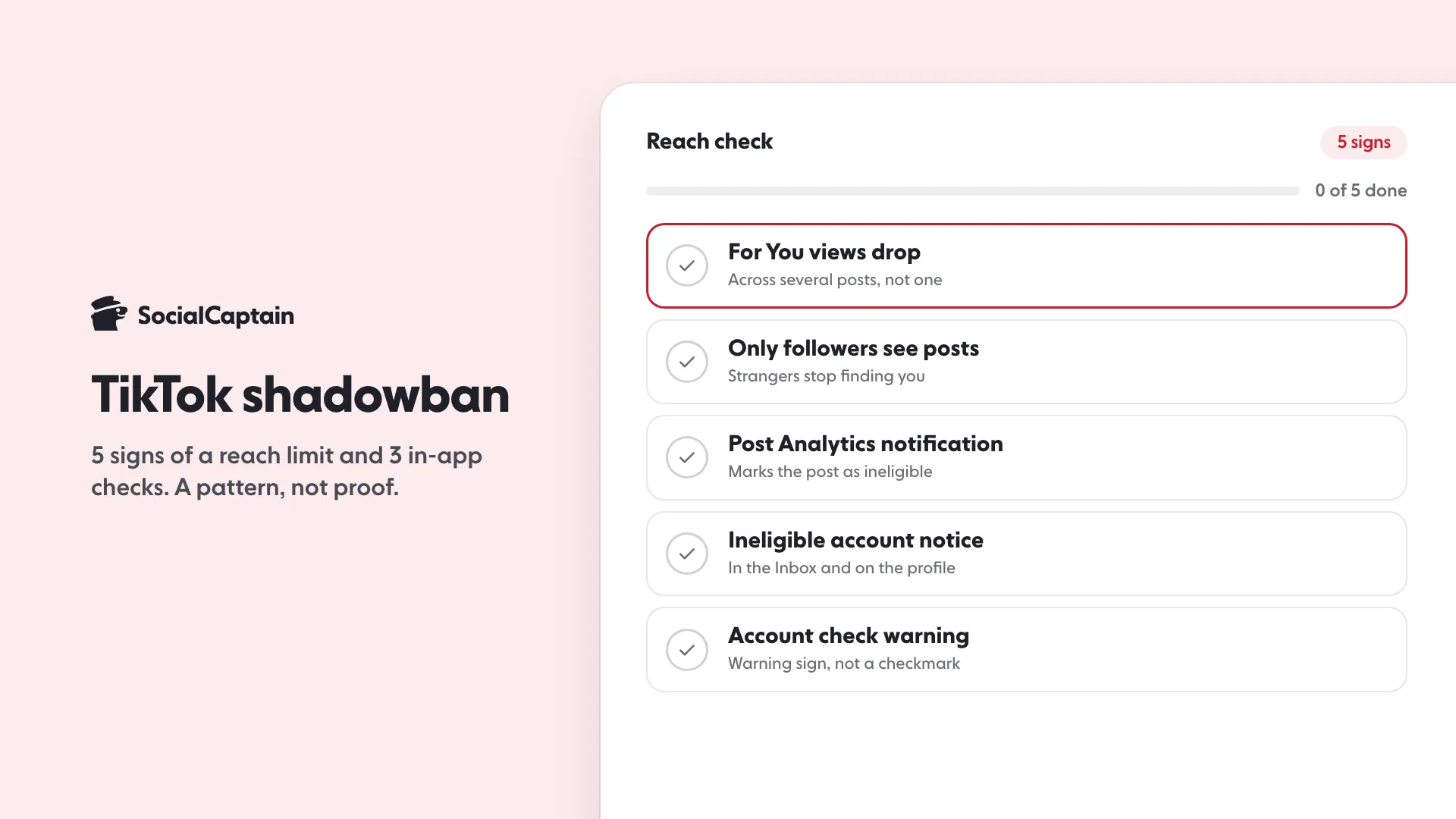
Three of the five come from TikTok itself, and two are patterns in your numbers. Treat the patterns as a reason to check, not as proof.
- For You views drop across several posts. Open Analytics and look at traffic sources. One weak post is normal variation, but a fall on your last several posts is worth a check.
- Followers still see your posts, strangers do not. Views from your followers hold while views from the For You feed fade.
- A post’s Analytics shows an ineligibility notification. This comes from TikTok and names the reason.
- An ineligible-for-recommendation notice appears on your account. TikTok says it notifies you in your Inbox and on your profile, showing what was flagged.
- Account check shows a warning. A checkmark means TikTok found no issue, and a warning sign means it did.
How do you check a post for For You feed ineligibility?
TikTok shows its decision inside the app, but only if Analytics is on. To turn it on:
- Tap Profile, then the Menu button.
- Select TikTok Studio.
- Tap Get started within Analytics, then Turn on.
Then, for the post you want to check:
- Go to the post and tap More insights, or tap More options and then Analytics.
- Tap the notification for the ineligible post, if there is one.
- Review the feedback. TikTok asks whether you understand why the post is not eligible, and the next screen lets you send feedback if you choose No.
If there is no notification, TikTok has not made that post ineligible, and the reason for the low views lies elsewhere. Why Is My TikTok Not Getting Views? 8 Causes and Fixes walks through those.
How do you check the whole account?
Look at three places, in this order:
- Inbox. TikTok sends account notices here, including a record under Account updates.
- The notice below your username. An “Ineligible for recommendation” notice means TikTok has limited the account’s recommendation. It lists the flagged videos.
- Account check. Open TikTok Studio, tap More tools, then Account check. Another route is Settings and privacy, then Support, then Safety Center, then Account check. It covers restrictions on posting, comments, profile edits, messages and login.
A clean Account check does not guarantee reach. It reports what TikTok lists there, and an eligible post is still ranked for each viewer one by one.
Can a shadowban checker tell you?
No. No outside tool can read TikTok’s internal status, so every checker infers from public numbers such as views and likes. Use the notices in your own account, which are the only signals that come from TikTok.
What are the 6 things that help?
- Read the reason first. The notice names the standard TikTok applied, which tells you whether to fix the post or appeal.
- Appeal from the notice. On a post, tap Appeal at the top of the notification. For an account notice, open it from the Inbox or the profile, review the videos and tap Appeal.
- Keep content up while an appeal is open. TikTok says that if you delete content while its appeal is under review, it may not be able to remove the violation from your record.
- Stop buying engagement. TikTok’s integrity rules say deceptive behavior such as bought followers or likes can lead to restrictions, including a limit on appearing in top search results or the FYF. Instagram Bots: 5 Things They Do and the Risks of Each explains the same risk on the sister platform.
- Post original content that fits the guidelines. Content from anyone under 16 is ineligible for the FYF, and the guidelines list other types of content that is not recommended.
- Compare like with like. Judge a change over your next several posts using your own Analytics, not over one day.
How long does it last?
TikTok publishes no duration. It says it may automatically restore an account to good standing at any time, depending on how much of the account’s content is unsuitable, and it does not say how long that takes. Any exact number of days you see online is unverified.
What about Instagram?
The same word is used there with a different system. Instagram Shadowban: 5 Signs, How to Check and 6 Fixes covers Account Status, and Instagram Algorithm 2026: 5 Ranking Signals Explained explains how recommendations work. For how TikTok ranks videos, see TikTok Algorithm 2026: 5 Signals and What Each Rewards.
If your reach problem is a small audience and not a limit, SocialCaptain’s plans add real followers matched to your niche, and the TikTok growth service page shows how growth is tracked.
FAQ
Is there a shadowban on TikTok?
TikTok does not use the word. It documents For You feed ineligibility: some content is not recommended in the For You feed, and an account that posts a lot of such content can be made harder to find.
How do you know if you are shadowbanned on TikTok?
Turn on Analytics in TikTok Studio and open each post’s Analytics for an ineligibility notification, check the Inbox and the notice below your username, and run Account check. Low views alone prove nothing.
How long does a TikTok shadowban last?
TikTok publishes no duration. It says it may automatically restore an account to good standing at any time, depending on how much of the content is unsuitable.
Can you appeal a For You feed decision?
Yes. Open the post’s Analytics, tap the notification for the ineligible post and tap Appeal at the top. If the appeal succeeds, the post becomes eligible for recommendation again.
Can a shadowban checker tell you if you are shadowbanned?
No outside tool can see TikTok’s internal status. Only the notices inside your own account come from TikTok itself.
Sources
- For You feed eligibility | TikTok Help Centersupport.tiktok.com
- Content violations and bans | TikTok Help Centersupport.tiktok.com
- For You feed Eligibility Standardstiktok.com
Related guides
Algorithm and reach
Instagram Algorithm 2026: 5 Ranking Signals Explained
Algorithm and reach
Instagram Shadowban: 5 Signs, How to Check and 6 Fixes
Algorithm and reach
TikTok Algorithm 2026: 5 Signals and What Each Rewards
Written by Luca Fenwick
TikTok editor
Luca Fenwick covers TikTok on the SocialCaptain blog: followers, views, the For You feed, bios, video formats and the creator programs. Each guide follows TikTok's own help pages and announcements, and lists its sources at the end.
All articles by Luca Fenwick


