Instagram Trial Reels: What They Are and 5 Steps to Post One
Quick answer
Instagram trial Reels show a new Reel to people who do not follow you before your followers see it. Tap Trial before sharing, read the insights within 24 hours, then tap Share to everyone if it did well. Public professional accounts need 200 followers.
- Personal accounts need 1,000 followers and a public profile
- Trial Reels do not affect your standard Reels' ranking
- Reposting a video you already shared may limit its reach
On this page9 sections
Instagram trial Reels let you show a Reel to people who do not follow you first, and keep it away from your followers until you decide to share it. To post one, make a new Reel, tap Trial before you share, read the insights that arrive within 24 hours, and then tap Share to everyone if it did well. Below are what trial Reels are, who sees them, the five steps to post one, how to read the results, and when to share with followers.
What are trial Reels?
A trial Reel is a normal Reel with one difference: Instagram shows it to non-followers first. Instagram’s help center describes trial reels as a way to experiment with new ideas and get early feedback on whether your content resonates, by sharing a reel with accounts that do not follow you. You can share a trial reel with your followers at any time.
Instagram announced the feature on 10 December 2024 and said it would reach all eligible creators globally over the following weeks. Its stated purpose is to let you test new genres, formats or topics without worrying how followers will react.
Need something to test? Our list of Instagram Reel ideas gives 30 formats. That makes a trial Reel a low-risk place to try things your usual audience may not expect: a new format, a different tone, a topic outside your niche. If the test flops, your followers never saw it and your profile stays as it was.
Who sees a trial Reel?
People who do not follow you see it first. Instagram’s help center says that after you share a trial reel, your followers will not see it in feed or Reels, and that trial reels do not appear on your profile unless you decide to share them to everyone.
There are exceptions. Instagram says some followers may still see your reel in other places: if it is sent to them in a direct message, on a page that shows reels with the same audio, or in search engine results.
Two other facts to know:
- Only you can tell. Meta’s announcement says only the creator can tell that a reel is a trial.
- It can take longer to get views. Instagram’s help center warns that trial reels may take longer to get views because they are shown to people who do not follow you.
Who can use trial Reels?
The help center sets two conditions. First, you need a public account. Second, you need a minimum number of followers, which depends on the account type:
| Account type | Minimum followers |
|---|---|
| Professional (business or creator) | 200 |
| Personal | 1,000 |
There is one more condition. If your public account is not eligible to appear in recommendations, you also lose access to trial reels, and you get it back when the account is eligible again and meets the other criteria. You can check for limits on your reach in Account Status in your settings. If you are unsure which account type to use, our guide to the creator and business account compares them.
How do you post a trial Reel in 5 steps?
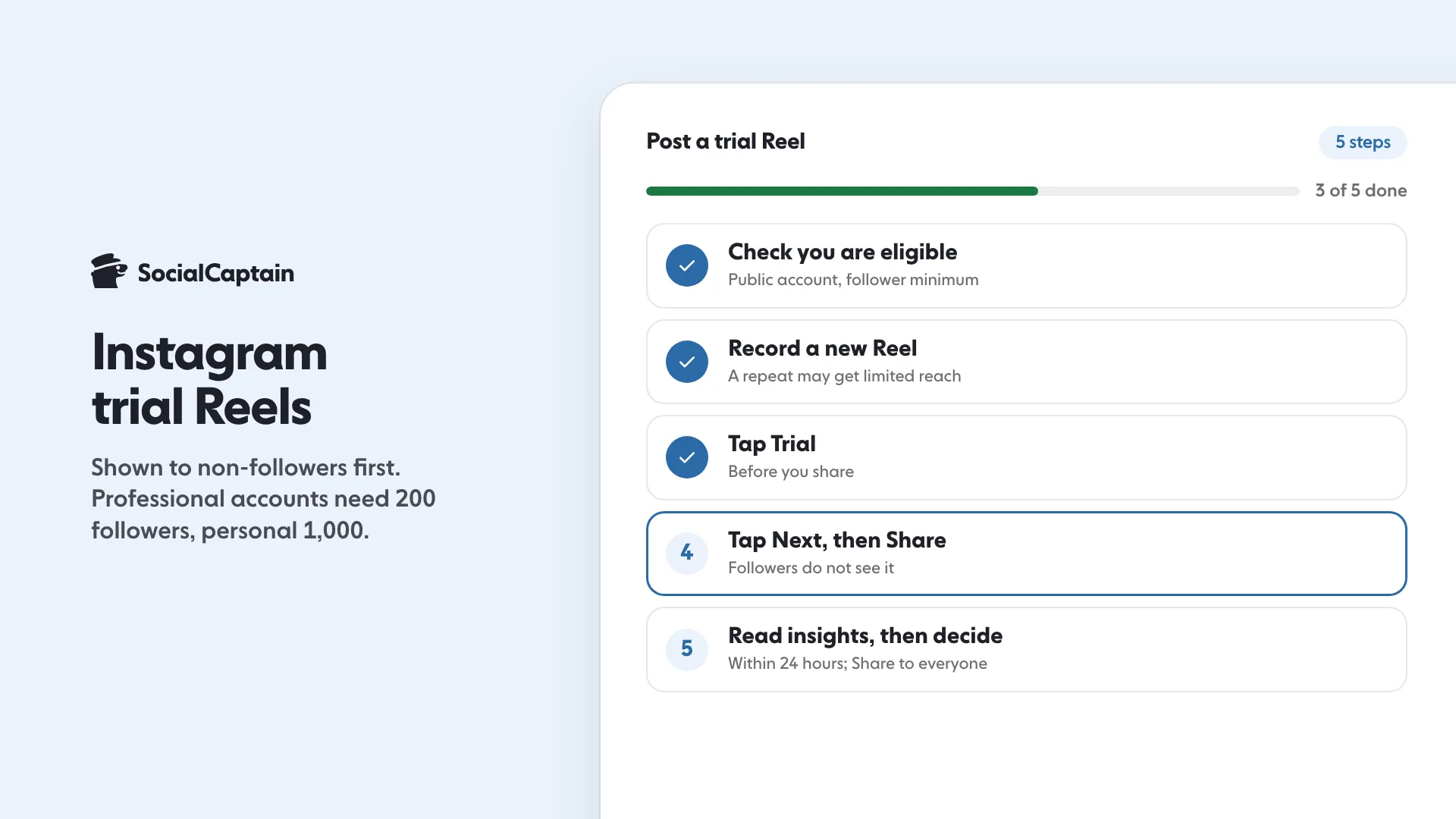
- Check you are eligible. Make sure the account is public, has the follower minimum above, and has no reach limits in Account Status.
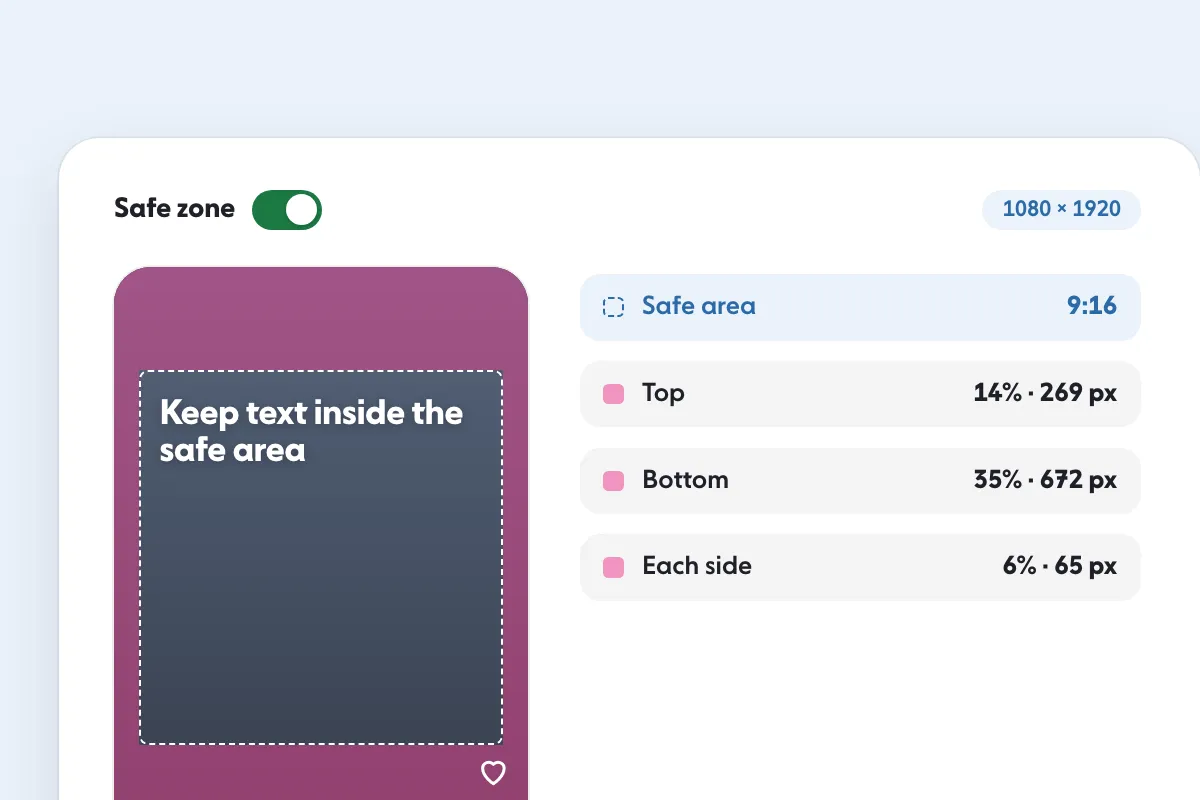
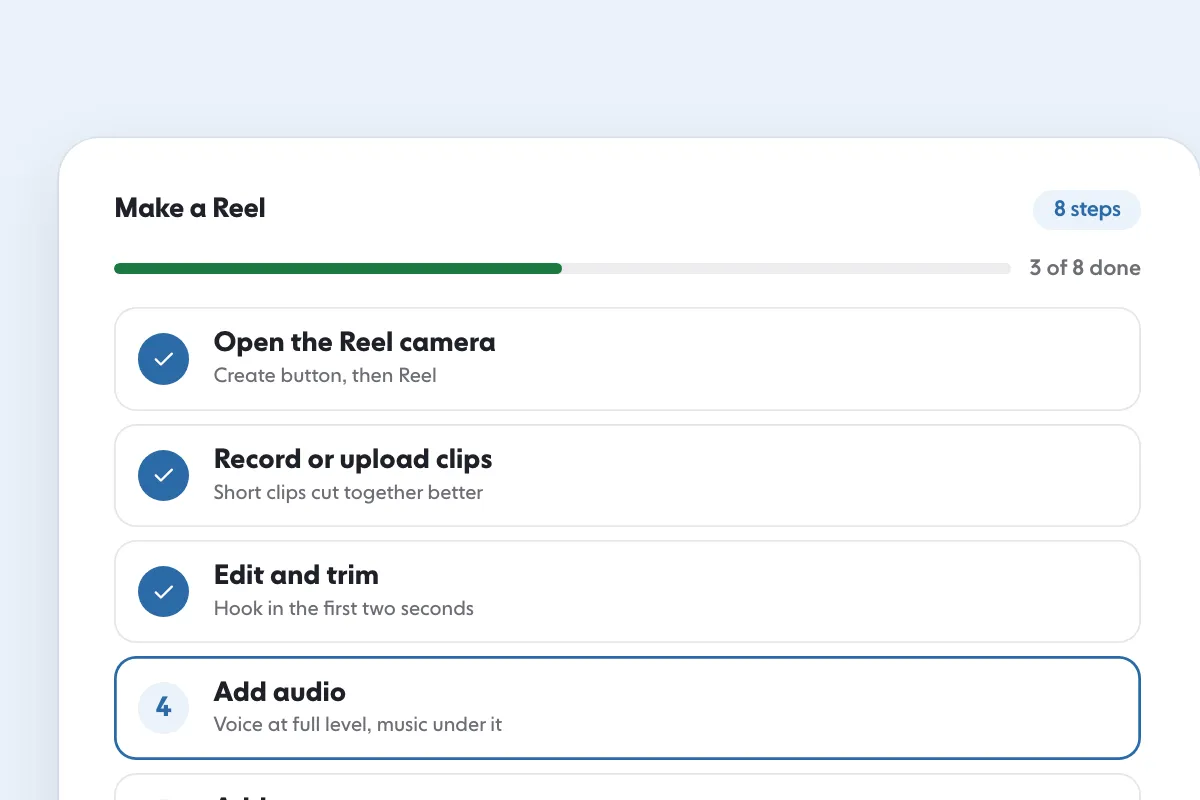
- Record a new Reel. Follow the normal steps to record a reel. Make a new one: the help center warns that a trial reel may get limited reach if Instagram detects that you have shared the same content before. If you need the basics, read how to make a Reel on Instagram and check the frame on our Reels safe zone checker.
- Tap Trial. On the screen where you would normally share, tap the Trial option. If you want Instagram to share the reel to followers automatically when it does well, tap Trial settings below Trial and turn on Share to everyone automatically. Instagram says this setting then applies to all your future trial reels until you change it, so check it each time.
- Tap Next, then Share. The trial reel is now live for non-followers, and it sits off your profile grid.
- Read the insights, then decide. Within 24 hours you can see how it performed. If it is doing well, go to your profile, open the reel, tap View insights and tap Share to everyone.
Meta’s developer documentation lists the same two modes for apps that publish through the API: manual, where you graduate the reel by hand in the Instagram app, and a performance mode where it graduates automatically if it performs well.
How do you read the results?
Open the reel from your profile and tap View insights. Instagram’s help center says the insights for a trial reel include views, likes, comments and shares, and Meta’s announcement adds that Instagram offers comparisons with your earlier trials. Reel insights in general also show watch time, average watch time and follows, which are defined on Instagram’s page for Reels insights: average watch time is the total watch time divided by the number of initial views.
Read them in this order:
- Views. Did Instagram show it to enough people to judge? If it got very few Reel views, wait before judging, since trial reels can be slow to start.
- Average watch time. If it is close to the Reel’s length, people stayed. If it is low, the opening may not have hooked them.
- Shares and comments. These show whether it made a stranger act. Instagram’s ranking explainer names resharing as one of the actions it predicts for Reels.
- Follows. The number of accounts that started following you as a result of viewing the reel.
Compare each trial with your earlier trials, not with your best normal Reel, because trial Reels reach a different group. Our Instagram Insights guide explains the other metrics, and if a trial gets very few views, check why Reels get low views.
When should you share a trial Reel to followers?
Share when the trial shows people outside your audience watching and reacting. Instagram’s help center suggests sharing it with everyone if it is performing well, and it then appears on your main grid and Reels tab and may be seen by followers in their feed and Reels tab.
A simple rule of thumb is to share when the trial’s average watch time and shares beat your last two trials. If it does not, keep the idea out of your profile and try a different version. The point of a trial is that a miss costs you nothing.
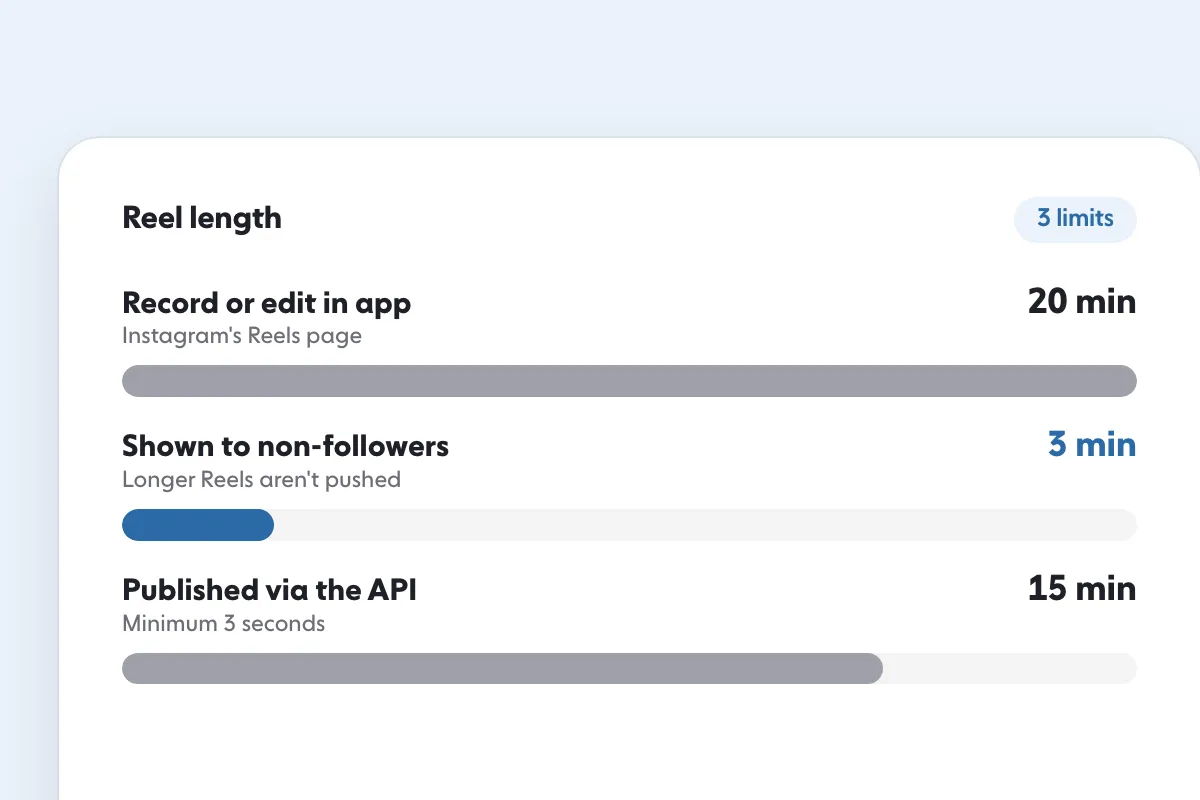
When you do share, the Reel then follows the same rules as any other, including Instagram’s length limits, and the size and safe-zone guidance in our Reels size guide.
Do trial Reels replace posting normally?
No. Instagram’s help center says trial reels are evaluated independently in ranking and do not impact the performance or ranking of your standard reels. Use trials to test what to post, then post the winners the normal way.
Trial Reels also do not build your follower count by themselves. They find out which content strangers respond to. SocialCaptain adds real followers who match your niche, country, language and interests, never bots, which gives every Reel you share, trial or not, an audience of the right people.
FAQ
What is a trial Reel on Instagram?
A Reel that Instagram shows to people who do not follow you before your followers see it. Your followers do not get it in feed or the Reels tab, and it stays off your profile unless you share it to everyone.
Who can use trial Reels?
Accounts that are public and meet a follower minimum. Instagram’s help center says a professional account needs at least 200 followers and a personal account at least 1,000, and that an account that cannot appear in recommendations loses access.
Do my followers see a trial Reel?
Not in feed or the Reels tab, and it does not appear on your profile. Some followers may still see it if it is sent to them in a message, on a page for the same audio, or in search engine results.
How long until I see trial Reel results?
Instagram’s help center says insights appear within 24 hours after you share. They include views, likes, comments and shares.
Do trial Reels hurt my normal Reels?
No. Instagram’s help center says trial reels are evaluated independently in ranking and do not affect the performance or ranking of your standard reels.
Can I post the same video again as a trial Reel?
It may get limited reach. Instagram’s help center asks you to make a new reel, because a trial reel may get limited reach if Instagram detects that you shared the same content before.
Sources
- About trial reels on Instagramhelp.instagram.com
- Trial reels: Try content with non-followers first to see what performs bestcreators.instagram.com
- Test Content With Non-Followers Using Trial Reelsabout.fb.com
- View insights on your Instagram reelshelp.instagram.com
- IG User Mediadevelopers.facebook.com
- Instagram Ranking Explainedabout.instagram.com
Related guides
Written by Clara Ivens
Instagram growth editor
Clara Ivens covers Instagram growth on the SocialCaptain blog: followers, Reels, hashtags, bios, captions and how reach works. Each guide follows Instagram's own help pages and announcements, and lists its sources at the end.
All articles by Clara Ivens


