How to Change Your Instagram Username in 6 Steps
Quick answer
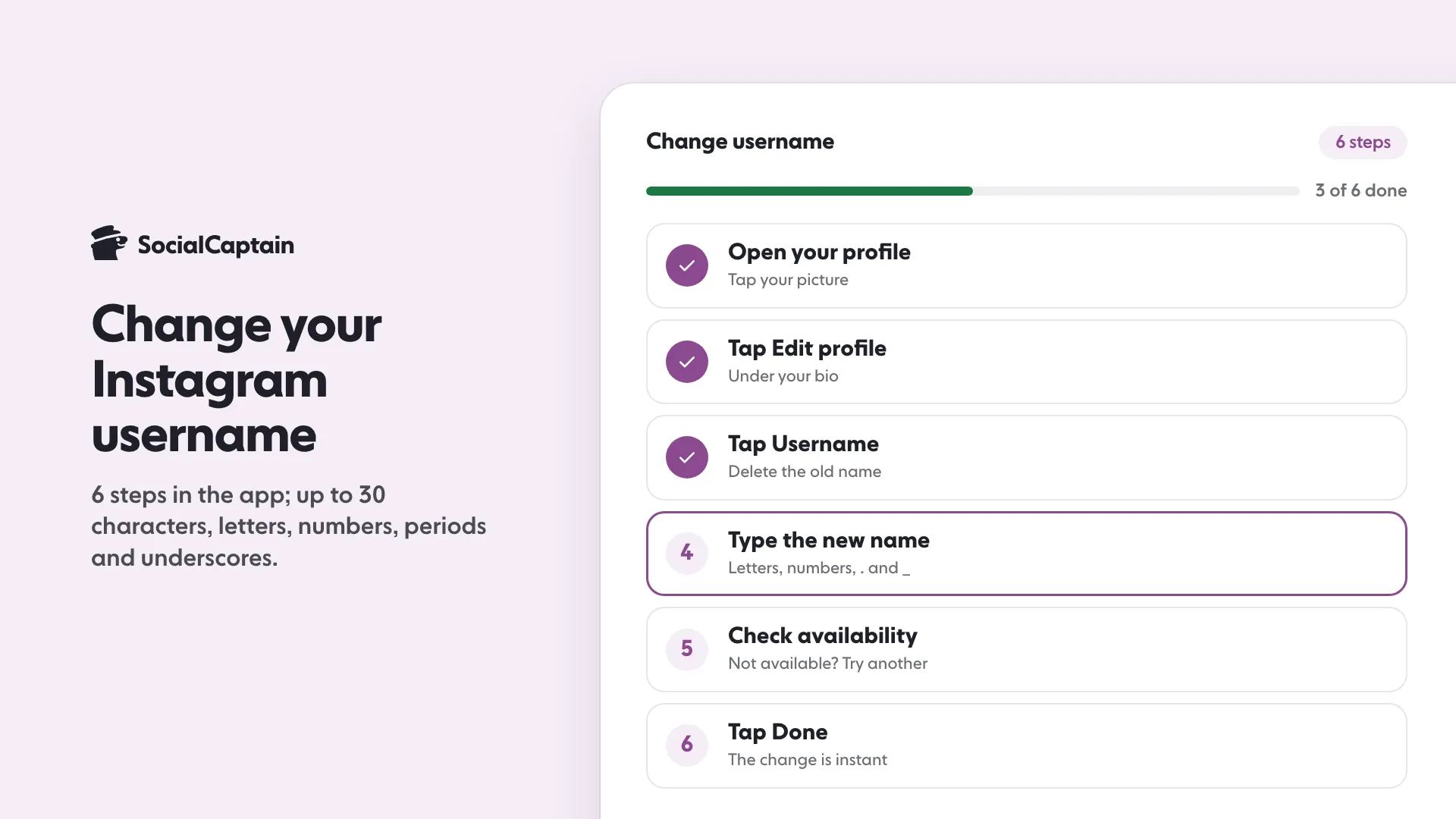
To change your Instagram username, open your profile, tap Edit profile, tap Username, type a new name of up to 30 characters, confirm it is available and tap Done. On the web, use Accounts Center.
- Allowed: letters, numbers, periods and underscores; no spaces or capital letters.
- Links containing your old username stop working, so update them the same day.
- Display name changes are separate and do not need to be unique.
On this page8 sections
To change your Instagram username, open your profile, tap Edit profile, tap Username, type the new name, check that it says it is available, and tap Done. That is 6 steps in the app on iPhone and Android. On the web you click Edit profile and Submit, or go through Accounts Center. Instagram checks the name as you type and tells you if it is not available.
How do you change your Instagram username?
In the Instagram app, on iPhone or Android:
- Open your profile by tapping your picture at the bottom right.
- Tap Edit profile.
- Tap the Username field and delete the old name.
- Type the new username. It must be one nobody else uses.
- Check the message. If it says the name is not available, try adding a period or underscore, or pick another.
- Tap Done (or the checkmark on some Android versions) to save.
For most accounts the change takes effect straight away. Menu labels differ between app versions, so if a screen looks different, look for the Username field inside Edit profile or Accounts Center.
Does it work the same on phone and web?
The result is the same, the path differs. Instagram’s Help Center lists two routes on instagram.com. The first:
- Click your profile picture on the left to go to your profile.
- Click Edit profile.
- Type the new username.
- Click Submit.
The second goes through Accounts Center: click More in the bottom left, click Settings, click See more in Accounts Center, click Profiles, click the profile, click Username, make the change and click Done. Instagram notes that not everyone can reach the Accounts Center setting yet.
What rules apply (length, characters)?
- Unique: no two accounts share a username, and the app tells you when a name is not available.
- Length and characters: the Help Center pages we opened do not list them. Guides commonly report up to 30 characters, using letters, numbers, periods and underscores, so type the name and read the message before you tap Done.
Your display name, the bold name on your profile, is separate from the username. If you only want a different name to appear, change the display name and keep the username.
If you need ideas that fit the rules, see Cool Instagram Usernames: 100 Ideas by Style (Free to Copy) or use the username generator.
How often can you change it?
Guides disagree here. Some say the 2-changes-in-14-days limit belongs to the display name and that usernames can change more often, while at least one guide applies it to the username. We checked several and none cited a fixed rule from Instagram, so the safest approach is to plan for one change and make it once, on a day you chose. Instagram says that if your account reaches a lot of people, the change may need to be reviewed first and you will be notified when the review is done; otherwise it changes immediately if the name is available.
Can you change it back?
In most cases, yes. Instagram’s Help Center says you can change a username back to a name you used before if the name has not been taken by a new person on Instagram and has not been recently removed from an active account you do not own. It gives no time window, so do not count on getting the old name back later. If you are not sure about the new one, type it in the field and read the availability message before you press Done.
What happens to old links and tags?
- Links to your profile break. Your profile web address contains your username, so any link that used the old one stops working until you update it.
- Your followers stay. It is the same account, with the same posts and followers.
- Handles typed as text do not change. A caption, comment or bio that spells out your old @name keeps the old name, and people mentioning you in future need the new one.
- Your old name may be taken by someone else. Once it is, you cannot change back to it.
- Your followers may be notified of the change, according to Instagram.
Make a list before you change: your bio links on other sites, your email signature, business cards, your website’s social icons and any pinned posts that say your handle. Update them the same day.
What should you check after the change?
Do these within a day:
- Update the username on your website, link-in-bio page and other social profiles.
- Post one Story or a pinned post telling followers about the change, so they recognise the new name.
- Check your bio. If you want it rewritten, the bio generator can draft options.
- Re-share any pinned posts that quote your old handle.
A new name also gives you a reason to refresh the profile. Instagram Bio Ideas: 60 Examples by Niche and Style has formulas, and Instagram Captions: 150 Ideas in 8 Moods You Can Copy can help with the announcement post.
If you are rebranding and want more people to find the new name, SocialCaptain’s plans add real, targeted followers who match your niche, country, language and interests.
FAQ
How do you change your Instagram username?
Open your profile, tap Edit profile, tap Username, type the new name, check that it is available and tap Done. On the web, click Edit profile, type the new name and click Submit, or use More, Settings and Accounts Center, Profiles.
What are the rules for an Instagram username?
Instagram’s Help Center pages do not list the character rules. Guides commonly report up to 30 characters, with letters, numbers, periods and underscores, and the app tells you if a name is taken or not allowed. No two accounts can share a username.
How often can you change your Instagram username?
Published guides disagree and none we checked cited a fixed rule from Instagram. Plan for one change, made once, on a day you chose.
Can you change your username back?
Usually yes. Instagram says you can change back to a name you used before if nobody new has taken it and it was not recently removed from an active account you do not own.
What happens to old links when you change your username?
Links that contain your old username stop working, while your followers and posts stay. Update your links on other sites the same day.
Related guides
Bio and captions
Instagram Captions: 150 Ideas in 8 Moods You Can Copy
Bio and captions
Cool Instagram Usernames: 100 Ideas by Style (Free to Copy)
Bio and captions
Instagram Bio Ideas: 60 Examples by Niche and Style
Written by Clara Ivens
Instagram growth editor
Clara Ivens covers Instagram growth on the SocialCaptain blog: followers, Reels, hashtags, bios, captions and how reach works. Each guide follows Instagram's own help pages and announcements, and lists its sources at the end.
All articles by Clara Ivens


