Best Day to Post on Instagram: 7-Day Grid, 4-Week Test
Quick answer
There is no single best day to post on Instagram, and Instagram publishes none. It advises posting when your audience is awake and most active. Find those days in Insights, then confirm them with a 4-week test of three daily slots.
- Test weekends as their own days; weekend routines differ for many audiences.
- Post at least 3 times per slot, then compare averages.
- Plan slots in your followers' local time, not yours.
On this page7 sections
There is no single best day to post on Instagram, and Instagram does not publish one. What it does say is to post when your audience is awake and most active, and to use your own insights to find out when that is. Below is a Monday to Sunday test grid with 3 daily slots, a way to adjust for your audience’s time zone, and a 4-week method that finds your best day with your own numbers instead of a guess.
What is the best day to post on Instagram?
The day your audience is most active. Instagram’s creator FAQ gives one piece of advice on when to publish: publish when your audience is awake and most active, and check your insights to learn their habits. It names no weekday.
The ranking explainer on Instagram’s own blog explains why timing still matters. For Feed, it lists when a post was shared among its signals, so recent posts from accounts you follow are what get considered. For Feed and Explore it also lists how quickly people like, comment, share and save, and says those popularity signals matter much more in Explore than in Feed or Stories. The creator FAQ also says it is not true that a lot of reactions in the first 30 minutes ranks a post higher, so timing is about who is online to see the post, not about chasing a burst of early likes.
So the day is an input to who sees the post, not a switch. Any list claiming that one weekday wins for every account is quoting someone else’s followers.
Here is what you can do with that:
- Open Instagram Insights. The Total followers view includes Most active times, by hour and by day, for your followers.
- Treat that as your starting point. It is the only source specific to you.
- Confirm it with a test. The method is below.
If you have no data yet, start with the test grid and let the first month decide.
What are the best hours on each weekday?
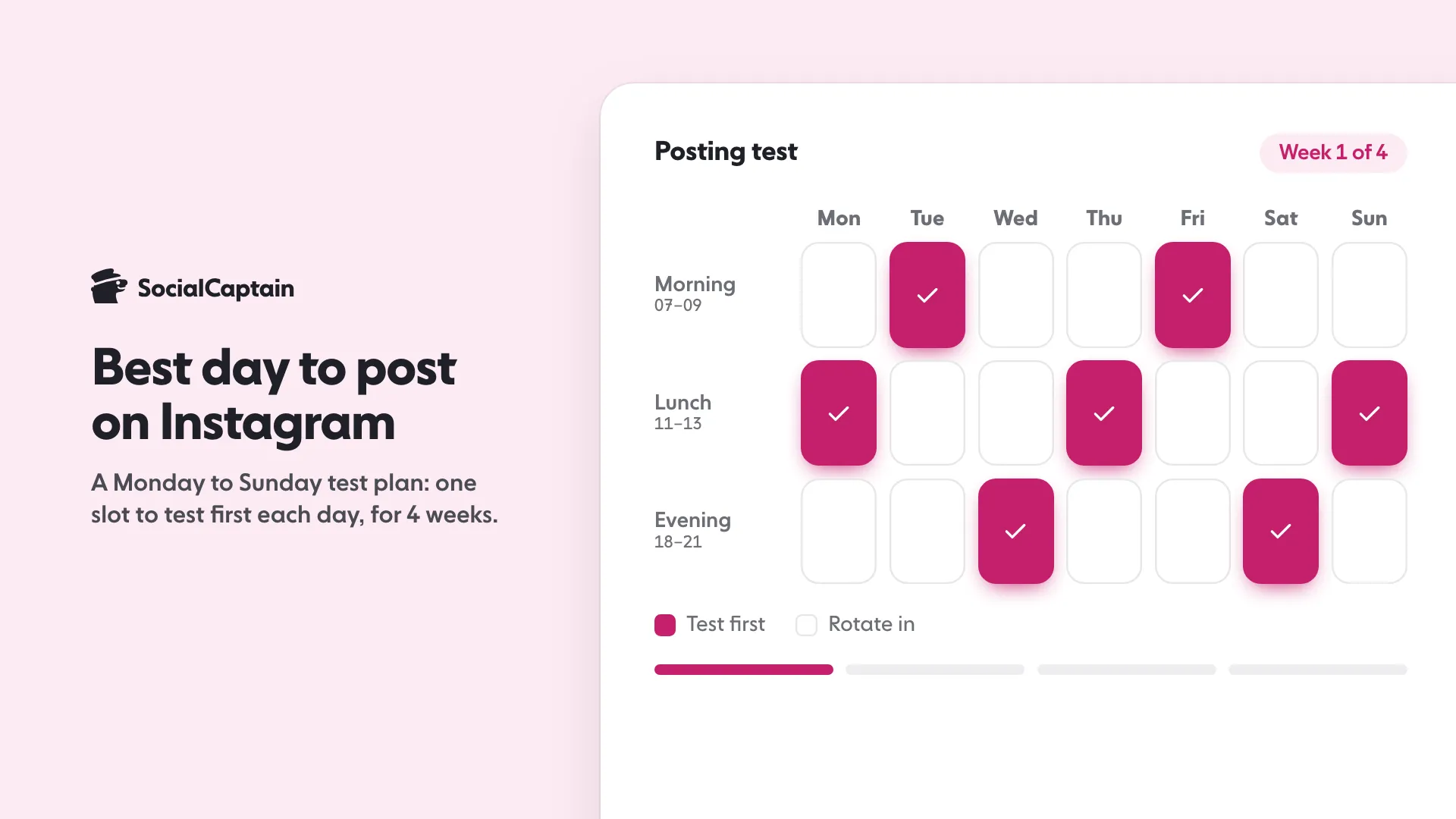
Instagram publishes no hours by weekday, so we will not invent them. What helps is a grid that covers every day at three different parts of the daily routine, so you can see which combination works for your audience.
| Day | Slot to test first | Other slots to rotate in |
|---|---|---|
| Monday | Lunch, 11:00 to 13:00 | Morning, evening |
| Tuesday | Morning, 07:00 to 09:00 | Lunch, evening |
| Wednesday | Evening, 18:00 to 21:00 | Morning, lunch |
| Thursday | Lunch, 11:00 to 13:00 | Morning, evening |
| Friday | Morning, 07:00 to 09:00 | Lunch, evening |
| Saturday | Evening, 18:00 to 21:00 | Morning, lunch |
| Sunday | Lunch, 11:00 to 13:00 | Morning, evening |
These are test starting points chosen to spread the three slots across the week. They are not claims about when Instagram users are online. Times are in the local time of most of your followers.
How to use the grid for each day
- Monday to Friday. Start with the slot shown, then move the same kind of post to another slot the next week. Keep the content type similar so the slot, not the post, is what you are measuring.
- Saturday and Sunday. Weekend routines differ from weekdays for many audiences, so test them as their own days. Whether your weekend is stronger or weaker is a question only your numbers answer.
- Business accounts. If you sell to other businesses, test weekday mornings and lunch first. If you sell to consumers, test evenings and weekends first. That is a reasonable guess, and the test will confirm it or not.
To see this next to your niche and time zone, the free best time to post tool gives a starting set of hours you can drop into the grid.
Is the weekend worse for posting?
Instagram does not say it is, and it does not say it is better. Whether weekends beat weekdays depends on who your audience is. People who follow a workplace tips account may scroll at lunch on a Tuesday. People who follow a travel or food account may scroll on a Saturday morning.
How to find out without guessing:
- Pick one weekday slot and one weekend slot and post comparable content in both for four weeks.
- Compare reach, saves and sends per post.
- Keep the winner and test a new slot against it.
Do not skip the weekend just because a guide told you to. Consistency matters, and a gap of days costs you the habit. How many posts a week to publish is a separate question, answered in Instagram posting schedule: 4 sample weeks by account size.
How do time zones change the answer?
Every slot above is in your audience’s local time, not yours. This is the mistake that ruins most timing tests: you post at 9 a.m. your time, but your biggest group is eight hours away and asleep.
Three steps:
- Find where your followers live. Insights shows top locations by country and city.
- Convert the slot to their local time. If most followers are in one country, use its time. If two countries are close in size, test both.
- Schedule the post so it goes out at that time without you being awake. Our guide to scheduling Instagram posts covers the options.
Instagram’s wording is the guide here: “when your audience is awake”. It is a statement about your followers’ clock, not yours.
How do you test your own best day?
A four-week test answers the question properly.
- Choose two or three slots from the grid, for example Tuesday morning, Thursday lunch and Saturday evening.
- Post at least three times in each slot over four weeks, with similar content.
- Record the results after three days. Use reach, saves, sends and comments for each post. The first hour is not the whole story.
- Compare averages, not single posts. One lucky post can hide a weak slot.
- Move the winner into your normal schedule and test a new challenger against it.
Instagram Insights: 9 metrics to track explains where each number lives. The Instagram algorithm guide covers the ranking signals behind them, and how long Instagram Reels can be helps you keep Reels comparable across slots.
Timing is a cheap lever and a small one. If the audience itself is thin, waiting for the perfect slot will not fix it. SocialCaptain brings real followers who match your niche, country, language and interests, never bots, so the hours you pick reach people who could become customers.
FAQ
Does the day I post still matter?
Instagram does not publish a best day, and what it states is about timing in general: post when your audience is awake and most active. The day matters only as far as it changes who is online, so test it on your own account instead of trusting a universal answer.
Should I post on public holidays?
Treat a holiday like any other test slot. If it is part of your niche, post and compare it with your normal days. If it is not, your own insights will show whether your followers are less active that day.
What if my audience is in several time zones?
Work out where most of your followers live in Insights and plan the slot in their local time. If a second group is large, test a second post for their time zone and compare the results.
How many weeks does a timing test need?
Four weeks, with at least three posts in each slot you compare. A single post can be lucky or unlucky, so only averages mean anything.
Do Reels and Stories have the same best day?
Instagram gives no separate day for each. Stories are shown while they are live, so the hour matters most for them. Test Reels and feed posts separately, because their results can differ on your account.
Is posting late at night worth it?
Only if your data says so. Instagram’s guidance is to post when your audience is awake, which for some audiences includes late evening. Add it to your test grid and compare it with your other slots.
Sources
- Instagram for Creators: Frequently Asked Questionscreators.instagram.com
- Instagram Ranking Explainedabout.instagram.com
- Reel size & aspect ratios on Instagramhelp.instagram.com
Related guides
Timing and planning
How to Schedule Instagram Posts: 3 Methods Step by Step
Timing and planning
Instagram Posting Schedule: 4 Sample Weeks by Account Size
Algorithm and reach
Instagram Algorithm 2026: 5 Ranking Signals Explained
Written by Lena Ashby
Creator business and analytics editor
Lena Ashby covers the business side of Instagram on the SocialCaptain blog: Insights and engagement rates, when to post, content plans and how creators earn. Each article says where its figures come from and lists its sources at the end.
All articles by Lena Ashby


